
Dynamic product ads (now branded Advantage+ catalog ads) automatically build product-level creative from your catalog and your Meta Pixel or Conversions API signals. Three things have to work together: a clean product catalog, tracking that fires ViewContent, AddToCart, and Purchase events correctly, and exact ID matching between those events and your catalog. Get all three right, and dynamic ads consistently outperform static retargeting for e-commerce.
TL;DR:
- Accurate ID matching between pixel events and catalog products is required for delivery, with exact matching necessary by 2026.
- Proper setup involves building a complete product catalog, installing tracking with event parameters, and verifying payloads before campaign launch.
- Feed quality—including accurate prices, specific titles, and high-quality images—is the most critical factor influencing ad performance.
- Small or sparse catalogs and low event volume often prevent campaigns from exiting the learning phase or delivering impressions.
- Addressing feed issues, pixel tracking mismatches, and catalog errors typically takes one to two weeks of diagnostic work to improve ad delivery and scaling results.
Table of Contents
- What Are Dynamic Product Ads on Facebook, Exactly?
- How Do You Set Up Facebook Dynamic Ads From Scratch?
- How Should You Structure Campaigns and Pick Audiences?
- Which Feed and Creative Habits Actually Move Performance?
- Why Are Your Dynamic Ads Not Delivering?
- How Do You Optimize and Scale a Dynamic Ads Budget?
- What Have We Learned Fixing Dynamic Ads for SMB Clients?
- When Should You DIY Dynamic Ads and When Should You Hire Help?
- How Atdigiagency Handles Catalog Ads for E-Commerce Brands
- Where to Go Deeper on Dynamic Ads Technical Setup
- Sources
What Are Dynamic Product Ads on Facebook, Exactly?
A dynamic product ad isn't a single creative. It's a template. Meta pulls the title, image, price, and availability straight from your product catalog and assembles the ad on the fly, matching whichever products a specific shopper viewed or added to cart. That's different from dynamic creative, which tests permutations of headlines, images, and calls to action you upload manually. Dynamic product ads are catalog-driven. Dynamic creative is asset-driven. Confusing the two is one of the most common setup mistakes seen in practice.
The format supports carousel, single image, and collection placements, and Meta will run it across Facebook, Instagram, and Audience Network by pulling from your full product catalog automatically. You don't manually pick which products show. The system does that based on browsing behavior and catalog rules you set.
One naming note worth clearing up: Meta has been rolling dynamic product ads into what it now calls Advantage+ catalog ads in Ads Manager. The mechanics haven't changed. Your catalog still drives the creative, your pixel still drives the targeting. What's changed is the label you'll see when you build a campaign, and in some accounts, more of the audience and placement decisions get automated by default. If your Ads Manager shows "Catalog" instead of the old "DPA" language, you're looking at the same product with a new coat of paint.
How Do You Set Up Facebook Dynamic Ads From Scratch?
Setup breaks into three layers, and skipping the order is why most first launches stall. Fix the data foundation before you touch a single campaign setting.
1. Build the catalog. You can upload a CSV, TSV, or XML feed directly in Commerce Manager, or connect a Shopify or WooCommerce store for automatic syncing. Shopify's Facebook and Instagram sales channel is the fastest path for most small stores. It creates and syncs the catalog automatically and can help configure pixel and CAPI dual tracking without a developer. Whichever method you choose, every product row needs these fields at minimum:
- Unique
id titleimage_linkpriceavailabilitylinkto the product page
2. Install tracking. Add the Meta Pixel to your site, and pair it with the Conversions API if your platform supports it (Shopify, WooCommerce, and most major carts do through an integration). CAPI sends events server-side, which catches purchases and add-to-carts that browser-based pixels miss due to ad blockers or iOS tracking restrictions.
3. Fire the right events with matching IDs. Meta needs ViewContent, AddToCart, and Purchase events, each carrying a content_ids parameter and a content_type parameter. This is where setups quietly break. If your catalog lists a product as SKU-1042 but your pixel fires content_ids: ["1042"] without the prefix, Meta can't connect the browsing event to the catalog item, and the ad simply won't populate for that shopper. As of 2026, Meta requires exact ID matching between event payloads and catalog product IDs for delivery to work consistently. Test this with Meta's Test Events tool before you spend a dollar on media. Watch the raw payload, confirm the content_ids array matches a real catalog ID character for character, and only then move to campaign setup.
4. Build the campaign. In Ads Manager, choose the Sales objective, select your catalog, then choose a product set (start with "All Products" or a curated set), pick your ad format, and preview the dynamic fields before publishing. The preview step matters. It's the only place you'll catch a broken image link or a missing price before real shoppers see it.
How Should You Structure Campaigns and Pick Audiences?
Audience strategy for dynamic ads comes down to matching creative intensity to purchase intent. A shopper who viewed a product yesterday needs a different message than one who abandoned a cart three weeks ago.
Tier your retargeting windows by recency:
- 1 to 7 days: cart abandoners and recent viewers. This is your highest-intent, highest-converting segment. Bid aggressively here.
- 7 to 14 days: broader viewers who didn't add to cart. Slightly cooler intent, still worth dedicated budget.
- 30 days or longer: catalog-wide viewers and past purchasers for cross-sell. Treat this as a lower-frequency, lower-bid layer.
For prospecting, Advantage+ catalog ads can extend dynamic creative to people who've never visited your site, using purchase and browsing signals from Meta's broader network. This works best once you have enough catalog depth and event volume. A very small product catalog with sparse traffic will struggle to exit the learning phase; a larger catalog with steady purchase events gives the algorithm more to work with. Seed prospecting campaigns with purchaser lookalikes, Shopify Audiences if you're on that platform, or a cleaned customer list, and give the algorithm a real signal to expand from.
The strongest full-funnel structure runs prospecting DPAs and retargeting DPAs as separate campaigns with separate budgets, not blended into one. That way you can see, plainly, whether new-customer acquisition or repeat engagement is doing the heavier lifting.
Which Feed and Creative Habits Actually Move Performance?
Feed quality decides more of your outcome than any bid strategy or audience trick. Experts and practitioners alike point to feed quality as the single biggest lever in whether a dynamic campaign performs, and that ordering, feed first, holds up in practice.
Run this checklist before you touch bidding:
- Titles should be specific and front-load the important detail ("Men's Waterproof Hiking Boot, Size 10" beats "Boot").
- Prices must match what's on the landing page exactly. A mismatch here kills trust and triggers Commerce Manager warnings.
- Image URLs need to be canonical, direct links to a clean, well-lit product shot, ideally on a white or neutral background at 1024x1024 pixels or larger.
- Availability status has to reflect real stock. Advertising an out-of-stock item burns budget and frustrates shoppers.
On the creative side, dynamic ads don't have to look generic. Overlaying price badges or discount tags at the catalog level keeps the automation intact while making product cards more clickable, and this is one of the easier wins available to a small team. Treat the catalog image as the primary asset; if you also want to test dynamic creative elements like a headline variant, layer those carefully so they don't override or clutter the product-first layout that makes dynamic ads work in the first place.
Filter product sets so you're not advertising discontinued or seasonal items outside their window, and sync your feed daily at minimum, more often if pricing or stock changes frequently.
Pro Tip: Before you write a single ad, open your product feed in a spreadsheet and sort by price. Anything showing $0.00 or blank is a silent killer that Commerce Manager sometimes lets through without flagging.
Why Are Your Dynamic Ads Not Delivering?
Most delivery failures are silent. The campaign runs, spends a trickle of budget, and shows zero or near-zero impressions, with no obvious error message pointing you to the fix. Work through these steps in order:
- Check Commerce Manager diagnostics first. It flags catalog-level errors like missing images, disapproved items, or expired links, and these often block delivery entirely before you even reach the ad level.
- Run Test Events. Confirm your pixel is firing
ViewContent,AddToCart, andPurchasewith the correctcontent_ids, and that those IDs match your catalog exactly, no prefix or formatting differences. - Review your event match quality score. This score reflects how confidently Meta can tie a browser or server event to a real person. Accounts that stack browser Pixel with server-side CAPI typically see match quality scores rise from the 5 to 6 range up into 7 to 9, which materially improves how reliably your audiences populate.
- Verify your product set isn't empty. A rule that's too narrow (for example, filtering to a category with no active listings) will quietly zero out your available inventory.
If all four check out and delivery is still thin, the catalog itself may simply be too small, or the event volume too low, for the ad set to exit its learning phase.
How Do You Optimize and Scale a Dynamic Ads Budget?
Fix the data before you touch the dial. That order, data, then creative, then audience, then budget, is the single biggest predictor of whether a scaling attempt succeeds or wastes spend.
Track these metrics as you scale, not just ROAS in isolation:
- ROAS relative to your margin, not just a flat target
- Purchase rate among people who reached the product page
- CTR, which should visibly improve once creative wrappers and titles are cleaned up
- Event match quality, which should trend upward after a CAPI install
- Frequency, watched closely in retargeting so you're not fatiguing the same 500 people
A common SMB mistake is expecting results from $10 a day. Facebook's user base is large enough to support serious prospecting reach, but a dynamic campaign needs enough daily spend to generate the events the algorithm learns from. If your retargeting pool converts fewer than one purchase a day at your current budget, you're likely underfunding the learning phase, not facing a targeting problem.
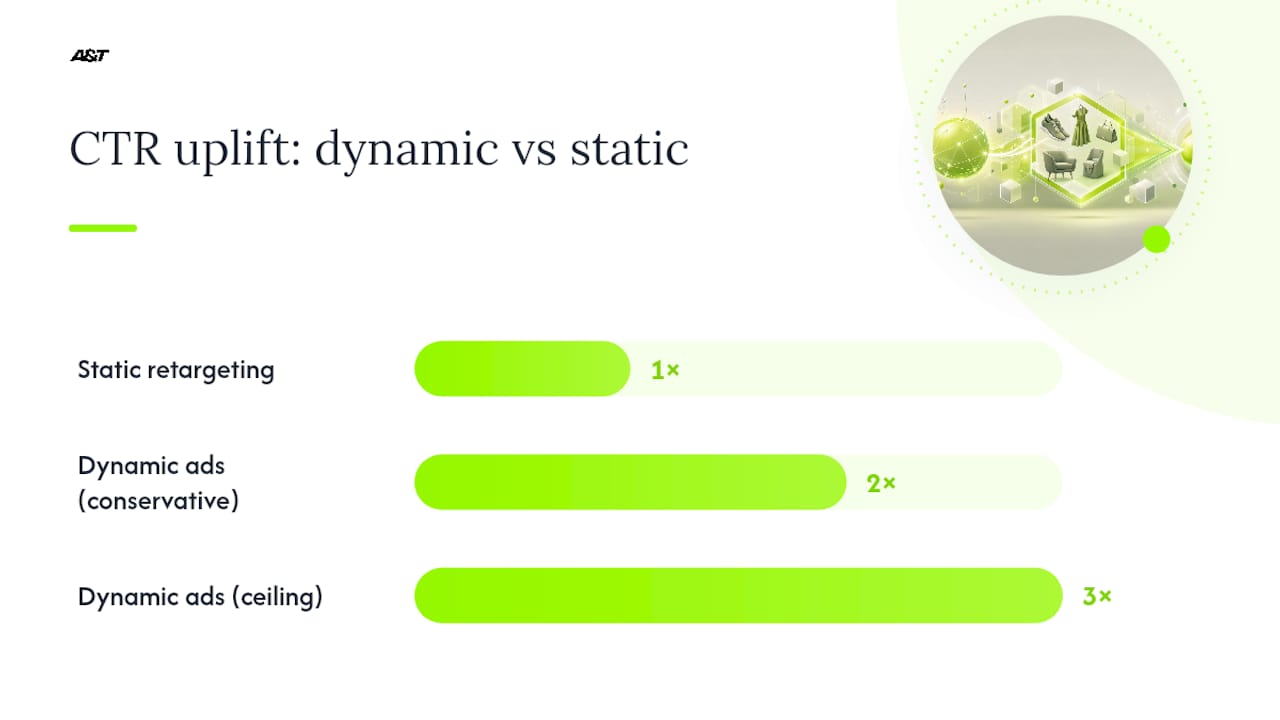
Well-executed dynamic ads with clean data can deliver 2 to 3 times the click-through rate and meaningfully lower cost per acquisition versus static retargeting, but that ceiling only holds once the feed and tracking layers are solid. Before increasing budget meaningfully, run a Conversion Lift or holdout test if your volume supports it. It's the only way to confirm the ads are driving incremental purchases and not just claiming credit for sales that would have happened anyway.
What Have We Learned Fixing Dynamic Ads for SMB Clients?
Many engagements start the same way: a client's dynamic ads are technically "live" but barely spending, and nobody on their team can say why. In one recent case, a retail client's feed had accurate prices but image links pointing to a CDN that periodically timed out, silently disapproving a third of the catalog. We fixed the hosting, resynced the feed, and impressions recovered within 48 hours.

In another case, a health and wellness brand had a working Pixel but no CAPI, and their content_ids used a different casing convention than the catalog. After resolving these issues, event match quality climbed and cost per purchase dropped over the following month.
These fixes usually take one to two weeks of diagnostic and implementation work before a campaign is ready to scale, not months. For deeper tactical detail on the creative side, our guide to dynamic ad copy and our retail-focused ROI breakdown cover ground this article only touches.
When Should You DIY Dynamic Ads and When Should You Hire Help?
If you have a clean catalog, a developer who can verify pixel events, and time to sit inside Commerce Manager weekly, DIY is entirely workable. Most SMBs, though, underestimate how much of the work is diagnostic, not creative, and that's exactly where things stall for weeks. Clients typically come to us asking for a feed audit first, tracking fixes second, and expect a real read on performance within four to six weeks of clean data flowing. If your ads have been live for a month with no meaningful spend, the issue may not be targeting. It is important to get the data checked before making other changes.
— Ann
How Atdigiagency Handles Catalog Ads for E-Commerce Brands
This guide addresses the setup work most SMB teams don't have the bandwidth to diagnose themselves. This may include product feed audits, Pixel and CAPI tracking installation or repair, rebuilding campaign structure, and handing off a system ready to scale, rather than one that looks live but quietly spends nothing.
Engagements typically move through three stages: an audit to find what's broken in your feed and tracking, a pilot campaign to confirm the fix worked and events are matching cleanly, then a scaling phase once ROAS and event match quality hold steady. We're a small team, so you get direct access to the people doing the work instead of a rotating account rep. If your dynamic ads have been underperforming and you're not sure whether the problem is your catalog, your tracking, or your audience structure, our Meta ads management team can run that diagnosis and tell you exactly what needs fixing first.
Where to Go Deeper on Dynamic Ads Technical Setup
For the technical weeds, start with Meta's own catalog and pixel requirements documentation, which stays current as Advantage+ catalog ads roll out further. For product-page quality, which directly affects your feed's landing experience, this guide on optimizing product pages is worth a read. And if you want a managed alternative to building tracking yourself, partners like MediaBloom's Facebook ads solution offer another route worth comparing.