
Fix Merchant Center disapprovals and landing-page mismatches first. That alone restores eligibility and often produces the largest immediate lift in impressions. Once eligibility is stable, google shopping feed optimization shifts toward richer titles, verified GTINs, and sharper images that Performance Max and Shopping campaigns can actually use to match buyers.
TL;DR:
- Prioritizing fixing disapprovals and landing-page mismatches can restore eligibility quickly and significantly increase impressions.
- Ensuring product identifiers, especially GTINs, are correct and titles match the landing page enhances visibility and click-through rates.
- High-quality, policy-compliant images with no watermarks or overlays improve ad appeal and reduce disapproval risk.
- Regularly monitoring Merchant Center warnings and disapprovals prevents silent declines in eligibility and performance.
- Structuring feeds with accurate categories, custom labels, and real-time updates supports effective performance maximization campaigns.
Table of Contents
- What Is the Fastest Way to Fix a Google Shopping Feed?
- How Do You Optimize Titles, Descriptions, and Product Identifiers?
- What Image Requirements Improve Shopping Feed Performance?
- How Do You Diagnose and Resolve Merchant Center Warnings?
- Should You Automate Feed Updates or Manage Them Manually?
- How Does Feed Structure Support Performance Max and Shopping Campaigns?
- What Does a Proven Feed Optimization Workflow Look Like?
- The Real Bottleneck Isn't Creative. It's the Feed.
- Get a Merchant Center Audit From Atdigiagency
- Sources
What Is the Fastest Way to Fix a Google Shopping Feed?
Start with a runnable checklist, not a strategy deck. The goal here is to remove blockers in hours, not weeks, so your existing ad spend stops being wasted on products Google won't even show.
Here's the order that actually works, based on how Merchant Center prioritizes issues:
- Open "Needs attention" first. This is where Google surfaces the problems actively suppressing your listings, and it ranks them by impact, not alphabetically.
- Run an item-level PID check. Preemptive item disapproval hits products before they ever serve, usually because of a price or availability mismatch between your feed and your landing page.
- Verify price and availability parity for every flagged SKU. A $49.99 feed price against a $54.99 checkout price is enough to trigger a disapproval.
- Confirm the required attributes are present and correctly formatted:
id,price,availability, andconditionneed exact, supported values, not close approximations. - Fix policy-violating images. Watermarks, promotional text overlays, and placeholder graphics are common, easy-to-miss disapproval triggers.
- Turn on automatic item updates where it makes sense, and increase feed upload frequency for SKUs with volatile pricing or stock.
None of this is glamorous work. But product data quality drives both eligibility and performance for Shopping ads and free listings, and a feed with unresolved eligibility issues wastes every dollar spent trying to improve its titles or images.
Pro Tip: Export your "Needs attention" list to a spreadsheet weekly, even when nothing looks urgent. Merchant Center issues stack silently, and a SKU that passed last month can fall out of eligibility the moment a supplier changes a price feed upstream.
How Do You Optimize Titles, Descriptions, and Product Identifiers?
Attribute quality is where most feeds quietly leak performance, even after eligibility issues are resolved. Get these right and Google's matching algorithms have far more to work with.
Title construction matters more than most marketers assume. Front-load the brand, product type, model number, and any critical attribute like size or color, in that order of importance. A title reading "Nike Men's Air Zoom Pegasus 40 Running Shoe, Black, Size 10" will out-perform "Great Running Shoes for Men" every time, because it gives Google's matching systems concrete signal instead of marketing fluff. Titles also need to match the landing page's own title text closely; Google's title guidance exists specifically to prevent the mismatch that triggers manual review.
Descriptions should describe, not sell. Avoid keyword-stuffing and skip promotional phrases that don't appear on the landing page itself. If your product page doesn't say "free shipping" or "best seller," your feed shouldn't either. Pull description copy directly from the landing page whenever possible; consistency here reduces disapproval risk and keeps Google's crawlers confident your data is accurate.
GTINs are non-negotiable when they exist. Submit the GTIN whenever the manufacturer assigns one. Google reports that retailers adding correct GTINs saw a roughly 20% average increase in clicks, because the identifier lets your product surface in more comparison contexts and appear correctly across Google surfaces. For private-label or manufactured goods without a GTIN, use the brand and MPN combination instead, and be consistent about it across your entire catalog.
Category structure needs similar precision:
- Use at least two to three levels of specificity in
google_product_categoryandproduct_type, not just a top-level guess. - When the language of a category label is ambiguous, choose the numeric taxonomy ID instead of the text string.
- For variants, give each one a unique
id, keep a consistentitem_group_idacross the group, and match color and size values exactly to what the landing page displays.
Retailers who add correct GTINs to their feed see an average 20% increase in clicks compared to listings without them, according to Google's own product identifier guidance.
What Image Requirements Improve Shopping Feed Performance?
Images do more work than most feed audits give them credit for. A blurry or watermarked main image gets disapproved outright; a clean one with room to breathe wins the click before the title is even read.
Follow these baseline rules:
- The main image must clearly show the product itself, with no promotional overlays, no watermarks, and no lifestyle clutter obscuring the item.
- Submit high-resolution images. Apparel and accessories in particular benefit from multiple angles, and variant-specific shots (each color, each size where visually distinct) reduce return rates as much as they lift CTR.
- Use Merchant Center's automatic image improvements when the fix is minor, like cropping or background cleanup, but replace the image yourself when the original is fundamentally low quality or policy-violating.
Pro Tip: Don't assume "automatic image improvements" means "problem solved forever." Re-check flagged image items after 30 days. The automation fixes what it can extract cleanly; anything requiring judgment gets left exactly as disapproved as before.
How Do You Diagnose and Resolve Merchant Center Warnings?
Merchant Center separates issues into tiers, and treating them all the same way wastes triage time. Account-level banners and the "Needs attention" panel flag the highest-impact problems first, and clicking into any issue opens the Issue Details Page, which shows exactly how many products are affected and what's causing it.
Three categories matter here, and they are not interchangeable:
- Warnings mean limited performance, not suppression. Your products still show, but something (a missing recommended attribute, a formatting quirk) is capping their reach.
- Product disapprovals mean the item is not eligible to serve at all, usually due to a policy violation or data quality issue caught after review.
- Preemptive item disapproval (PID) happens before review, typically triggered by a detected price or availability mismatch between the feed and the live landing page.
| Issue type | What it means | Typical fix | Review window after fix |
|---|---|---|---|
| Warning | Reach limited, item still serves | Add missing recommended attribute or correct formatting | Usually reflected within a few days |
| Product disapproval | Item not eligible to serve | Correct the flagged policy or data issue, then request review | 3 to 7 days |
| Preemptive item disapproval | Suspended before full review, usually price/availability mismatch | Fix landing page parity, resubmit feed | 3 to 7 days |
For common issues like missing identifiers, broken image URLs, or price mismatches, fix the root cause in the feed or on the landing page, then request re-review directly through the Issue Details Page. Build in a 3 to 7 day review window as a standard operational assumption, not an exception, and export the affected SKU list before you start fixing anything so you have a clean before-and-after to confirm the fix worked.
Should You Automate Feed Updates or Manage Them Manually?
Cadence is a decision, not a default. Scheduled file feeds work fine for catalogs with stable pricing and slow-moving inventory, uploaded once or twice daily. But once you're managing frequent intraday price changes or a catalog running into the tens of thousands of SKUs, the Content API becomes the more reliable option, since it pushes updates as they happen instead of waiting for the next scheduled crawl.
A few operational notes worth acting on:
- Automatic item updates extract price, availability, and condition data directly from your landing pages to fix temporary mismatches, but Google is explicit that this covers only a small percentage of products and isn't a substitute for keeping your actual feed current.
- Clean, consistent structured data (schema.org markup for price and availability) improves how reliably Google's extractors read your landing pages, which directly reduces false-positive PID triggers.
- Monitor crawl frequency. Increasing how often Googlebot revisits your site, through consistent sitemap signals and stable page structure, reduces the lag between a real-world stock change and Google catching up to it.
Treat automatic item updates as a safety net, never as your primary update mechanism.
How Does Feed Structure Support Performance Max and Shopping Campaigns?
Feed fields are also campaign levers, and this is where a lot of ecommerce marketers leave performance on the table. custom_label_0 through custom_label_4 let you segment inventory by margin band, seasonal relevance, promotional grouping, or clearance status, which then lets you bid differently on a 60%-margin bestseller versus a clearance SKU you just need gone.
- Use
promotion_idand marketing sync to surface visible promotions and support local inventory ads. - Aim for catalog coverage above 95% of your targeted SKUs; Google's own guidance on AI-driven commerce frames broad, clean coverage as the raw material Performance Max needs to match products against buyer intent effectively.
- Keep a "catch-all" campaign running to capture orphaned SKUs that fall outside your segmented campaigns while feed issues get resolved, so nothing sits invisible during cleanup.
Pro Tip: Review your custom label assignments quarterly. A margin band or seasonal flag set correctly in January can be stale by June, and PMax will keep bidding against outdated logic until someone corrects it.
Structured, well-labeled feeds also pair naturally with tighter ad creative testing, since segmented campaigns make it easier to isolate which creative variables are actually moving performance.
What Does a Proven Feed Optimization Workflow Look Like?
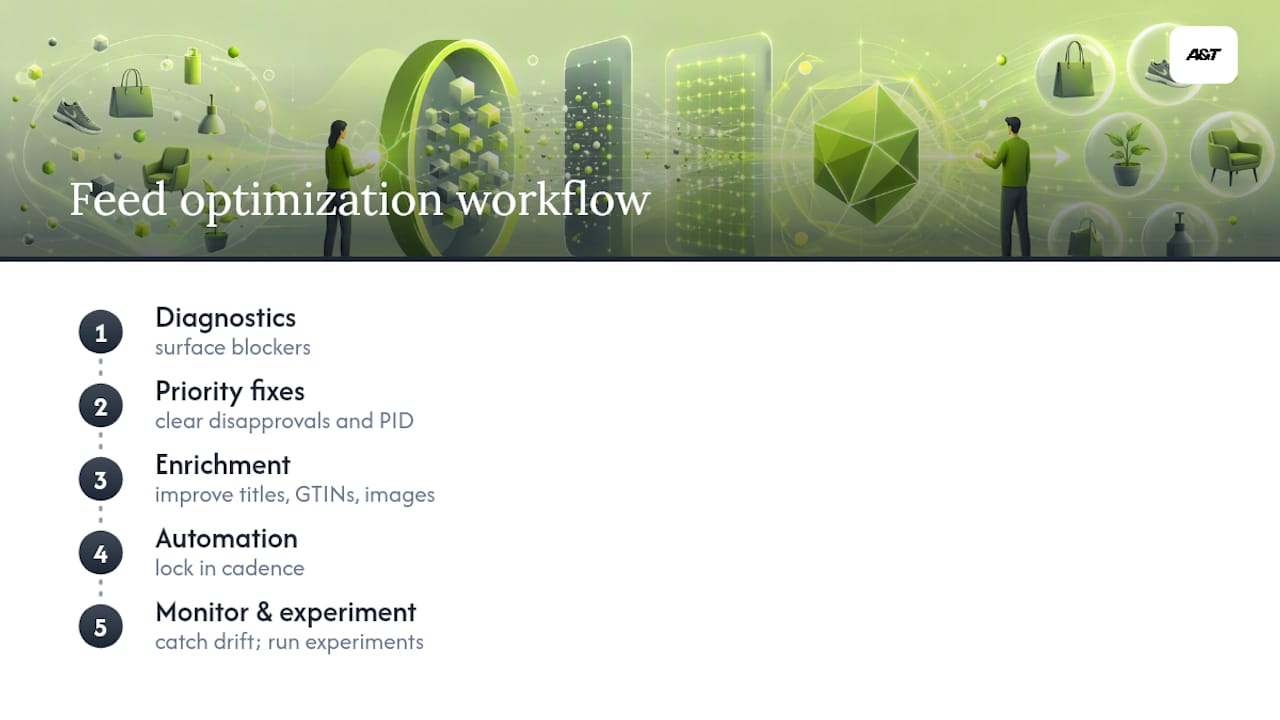
Atdigiagency runs the same five-stage sequence on every client feed: Diagnostics, priority fixes, enrichment, automation, then monitor and experiment. Diagnostics surfaces the blockers; priority fixes clear disapprovals and PID; enrichment improves titles, GTINs, and images; automation locks in cadence; monitoring catches drift before it becomes a new disapproval.
This sequence has produced measurable coverage and CTR gains across telehealth, entertainment, and retail clients where feed health was the bottleneck limiting Performance Max results, not creative or budget.
The Real Bottleneck Isn't Creative. It's the Feed.
Most advice on Google Shopping performance jumps straight to title formulas and image tricks, as if every product is already eligible to serve. It isn't. The single biggest gap between what marketers optimize and what actually moves revenue is eligibility itself. A perfectly written title on a disapproved item earns zero impressions.
What gets underestimated is how much of this is a data hygiene problem wearing a marketing costume. Price parity, GTIN coverage, and landing-page consistency aren't glamorous, but they're the load-bearing walls. Enrichment work, better titles, richer images, smarter labels, only pays off once the structural issues are cleared.
The reader's real priority order should be: fix what's suppressing the feed, confirm parity, then enrich for reach. Skipping straight to enrichment on a feed full of PID issues is like repainting a house with a cracked foundation. It looks better in photos and still falls down.
— Ann
Get a Merchant Center Audit From Atdigiagency
Atdigiagency runs the same diagnostics-to-automation workflow described above for clients directly, without the trial-and-error most in-house teams spend months on. That's the concrete difference: instead of guessing which of forty Merchant Center warnings actually matters, you get a prioritized fix list built from a tested five-stage process.
Services include full Merchant Center audits, feed remediation, Content API integration for real-time updates, and ongoing Shopping and Performance Max campaign management. Clients working through this process typically see disapprovals cleared, catalog coverage climb, and measurable CTR and ROAS gains within a 90-day window.
If your feed has unresolved "Needs attention" items right now, that's the place to start. Request a Merchant Center audit through Atdigiagency's Google Ads management team and get a prioritized fix list before you spend another dollar on campaigns your products can't even serve into.
Sources
For deeper reading: Google's product data specification, the Issue Details Page guidance, and Feed Optimisation in the AI-Driven Commerce Era for AI-matching context. For broader ecommerce visibility strategy, see why SEO drives sustainable ecommerce growth.
- Product data specification - Google Merchant Center Help
- Feed Optimisation in the AI-Driven Commerce Era - Google Shopping Solutions