
Before you do anything else, confirm five things: your demand forecast, your hero offer, your inventory position, your tracking setup, and your staffing plan. If any one of those five is soft, peak season will find the gap and charge you for it. This retail peak season campaign checklist gives you the full sequence, but if you only have ten minutes today, work through the list below first.
We built this from watching campaigns break in the same three places every year: undertracked conversions, understaffed fulfillment, and creative that got approved too late to test. None of that is exotic. It's just unglamorous work that gets skipped when the calendar tightens.
Here's the one-page version. Print it, paste it into your project tool, or hand it to whoever owns launch day.
- Forecast locked: last peak-window sales, trailing 12-month velocity, and a documented base/surge scenario.
- Hero offer finalized: one primary promotion per channel, with dates and discount depth signed off.
- Inventory position confirmed: SKU-level stock counts matched against surge scenarios, with buffer stock for top sellers.
- Tracking verified: pixels and server-side events tested end-to-end on a real purchase, not a staging environment.
- Channel schedule built: a promo calendar mapping exact dates to exact channels and exact offers.
- Staffing plan set: headcount by function, shift coverage for peak days, and a named decision owner for escalations.
- Contingency plan written: a one-page playbook for stockouts, carrier delays, and tracking failures, distributed to every stakeholder before launch.
A recent Gartner marketing survey found nearly one-third of consumers plan to start holiday shopping before November even begins. That single stat is why "peak season prep" can't start the week before Black Friday. Every section below expands on one of these checklist items, in the order you should actually tackle them.
Pro Tip: Keep this list visible somewhere your ops and marketing teams both see daily. The most common peak-season failure isn't a missing task. It's a task one team assumed the other team owned.
Key Takeaways
A retail peak season campaign checklist works only when marketing and operations lock forecasts, tracking, and staffing together on one shared timeline, not separately.
| Point | Details |
|---|---|
| Forecast first | Use last peak-window data, trailing 12-month velocity, and a surge scenario to set PO quantities. |
| Lock the hero offer early | Finalize creative and offer terms by late summer to avoid costly late-cycle acquisition costs. |
| Test tracking end-to-end | Validate purchase events and server-side tagging with a real transaction, not a staging test. |
| Get 3PL commitments in writing | Confirm labor ramp, space, and receiving cutoffs before peak volume hits, ensuring these commitments are documented. |
| Run peak execution with Atdigiagency | Project-based Google Ads and Meta Ads management built around your specific launch date. |
Table of Contents
- Historical Analysis and Demand Forecasting Checklist
- Building a Retail Peak Season Campaign Checklist for Media and Budgets
- Creative, Merchandising, and Product Feed Readiness
- What Should Your Tracking and Measurement Checklist Include?
- How Do You Prepare Fulfillment for Peak Demand?
- Staffing and Training for Peak Season
- Sample 8-Week Pre-Peak Timeline and Launch Schedule
- What KPIs Should You Track During Peak Season, and How Often?
- Downloadable Checklist, Templates, and Quick-Print Assets
- What Lessons Come From Recent Peak Seasons?
- How Atdigiagency Supports Peak Season Readiness
- Three Actions to Prioritize This Week
- Sources
Historical Analysis and Demand Forecasting Checklist
Your forecast is only as good as the windows you pull it from. Use three data sets, not one: your last comparable peak event, your trailing 12 months of full-price sales, and a clean baseline of what a promotion alone (without seasonality) typically lifts. Blending these three keeps you from mistaking a seasonal spike for a promotional one, or vice versa.
Once the data's in, build two scenarios: a base case using conservative year-over-year growth, and a surge case that assumes a stronger response, above base depending on your category's volatility. The surge case is what should drive your purchase order quantities and your 3PL receiving schedule, not the base case. Ordering to the middle is how brands run out of their best-selling SKU on day three of a five-day sale.
Before you finalize anything, verify these data points at the SKU level:
- Unit velocity for your top 20% of SKUs by revenue, since that tier usually drives 70% or more of peak sales.
- Channel-specific conversion rates, since a SKU that converts well on paid social may lag on marketplace listings.
- Historical return rates by category, which affects both your inventory buffer and your customer service staffing.
- A buffer multiplier by SKU tier: heavier buffer on hero products, lighter on long-tail SKUs that rarely sell out.
A 90-day preparation window is the standard recommendation for forecasting, supplier commitments, and inventory positioning ahead of a Black Friday or Cyber Monday event. That timeline isn't arbitrary. It matches how long most suppliers need for production and freight, and it gives you room to stress-test before you're live.
Pro Tip: If your category involves kitting, bundles, or gift sets, your supplier commitments need to lock even earlier. Retail B2B and kitting programs often require component POs finalized by August for a Q4 launch, because configuration and assembly add weeks that a single-SKU order doesn't.
Building a Retail Peak Season Campaign Checklist for Media and Budgets
The campaign side of your retail peak season campaign checklist starts with one decision: what is the hero offer, and which channel owns which job. Paid search and paid social typically drive net-new demand. Email, SMS, and retargeting convert warm traffic and protect margin. If you haven't assigned those roles before creative production starts, you'll end up with disjointed messaging and wasted spend correcting it mid-flight.
Build your promo calendar with actual dates attached to actual channels, not a loose list of "ideas for BFCM." A workable calendar names the offer, the start and end date, the primary channel, and the creative asset ID for each entry. Teams that lock creative and offer by late summer and use owned channels like email for early list-building consistently spend less to acquire the same customer in November, because they're not competing for cold traffic at the peak of the auction.
Your audience plan should prioritize in this order: VIP and repeat buyers first, high-intent site visitors and cart abandoners second, and cold lookalike or prospecting audiences third, scaled up only once your tracking confirms the first two segments are converting cleanly. Ramping cold spend before you trust your data is how budgets get burned on unqualified clicks.
Budget phasing matters more at peak than any other time of year. Cost-per-click on paid search and paid social typically climbs through the peak week as every retailer bids for the same shoppers, so a flat weekly budget will underperform. Front-load a portion of spend into the days before peak to build audience signal, then hold reserve budget to react to real-time CPC spikes rather than committing it all up front.
The tactical media checklist for launch week looks like this:
- Finalize all ad creative variants, including at least one urgency-driven "last day" asset per hero offer.
- Confirm ad extensions, promotion feed tags, and sitelinks reflect the correct dates and discount amounts.
- Brief creative teams on 2 to 3 variants per placement so you have testing room without diluting spend.
- Pre-schedule every promotion inside your ad platform's scheduling tools well before launch, since live edits during peak windows are a common source of costly errors.
Our retail campaign planning guide walks through this sequencing in more depth if you're building the plan from scratch this year.
Pro Tip: AI agents are becoming a real product-discovery channel. Glossy's 2026 research on holiday marketing highlights how AI shopping tools are increasingly surfacing products for consumers, which means your product metadata and structured content need to be clean enough for a machine to parse, not just a human. Clear titles, complete attributes, and accurate availability data all feed that discovery layer. Our piece on search intent targeting in retail covers how to structure content for this shift.
Creative, Merchandising, and Product Feed Readiness
A perfectly targeted ad pointing to a broken product feed still fails. Finalize your hero creative first, since that's what carries the primary offer across paid channels, then move to product-level creative for individual SKU ads, and last, your urgency assets for the closing days of each promotion window.
Before any of that creative goes live, audit your product feed line by line. Missing GTINs, out-of-sync inventory counts, incorrect shipping options, and unapplied promotion tags are the quiet reasons a well-funded campaign underdelivers. Run a feed QA pass at least a week before launch, and again 48 hours before, since inventory and pricing shift fast in the final stretch.
Your site itself needs the same scrutiny. Check landing pages load correctly on mobile, banners reflect the right dates, order cutoffs are stated clearly on product pages, and promo labels match what's actually being applied at checkout. A mismatch between an ad's promised discount and the site's displayed price is one of the fastest ways to spike cart abandonment and customer complaints simultaneously.
| Point | Details |
|---|---|
| Feed completeness | Confirm every active SKU has a GTIN, live stock count, and correct shipping options before launch. |
| Promo tag accuracy | Match feed-level promotion tags to the exact discount shown on the landing page and at checkout. |
| Urgency asset timing | Schedule last-day creative to activate automatically rather than relying on a manual swap. |
| Mobile QA | Test every landing page and banner on mobile, since most peak traffic arrives there first. |
Our types of retail discount campaign ads piece has specific creative formats worth testing if your current offer library feels thin.
What Should Your Tracking and Measurement Checklist Include?
Confirm your pixel and server-side tracking across every channel before you spend a dollar on peak media. That means testing a real purchase end-to-end, not just checking that a pixel fires on page load. Server-side tracking especially needs validation, since browser restrictions and ad blockers have made client-side-only tracking unreliable for accurate attribution.
If you're running automated bidding strategies through Google Ads or Meta, apply seasonality adjustments manually. Automated bidding models learn from historical conversion patterns, and a sudden peak-season demand spike can confuse the algorithm into under-bidding right when you need volume most. Flagging the seasonal event to your bidding system in advance, where the platform supports it, helps it adjust faster.
Your tracking checklist should confirm:
- UTM parameters are consistent across every channel and every campaign, so reporting doesn't fragment into unattributed traffic.
- Channel-specific promo codes are mapped correctly in your reporting dashboard.
- Attribution windows are set appropriately for your sales cycle, not left on platform defaults.
- Reporting dashboards are built and tested before launch day, not assembled reactively once data starts coming in.
More than half of enterprises can't access real-time data during their own campaigns, and roughly 60% are sitting on what's called dark data, information collected but never actually used to inform decisions. That gap is exactly where peak-season decisions go wrong, because teams are reacting to yesterday's numbers instead of this morning's.
| Tracking Item | Verification Method | Timing |
|---|---|---|
| Purchase event firing | Complete a real end-to-end test transaction | 2 weeks before launch |
| Server-side tagging | Cross-check platform data against order management system | 1 week before launch |
| Attribution windows | Confirm settings match your typical purchase cycle length | 1 week before launch |
| Dashboard reporting | Run a dry test with sample data | 3 days before launch |
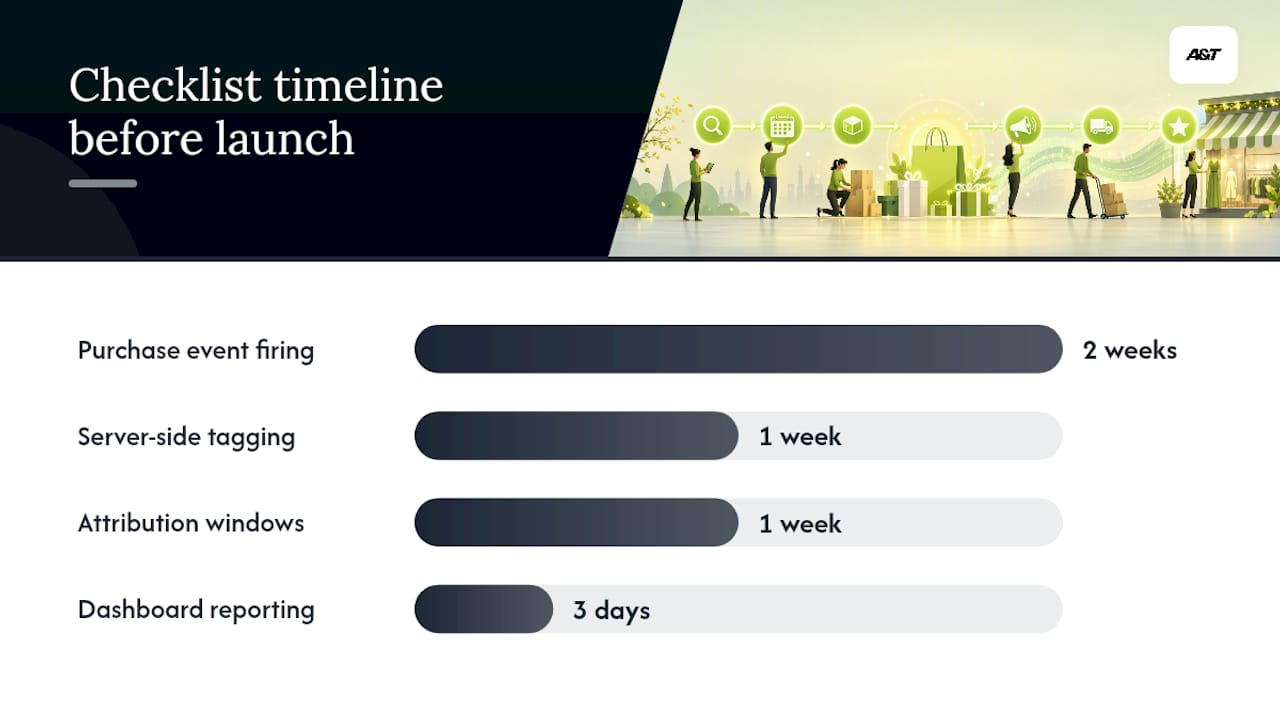
Pro Tip: Define your incremental lift tests before peak starts, not after. A simple holdout group, even a small geographic or audience split, tells you whether a promotion actually drove new revenue or just pulled forward sales that would've happened anyway. Our guide to analyzing campaign data for better ROI covers how to structure that kind of test without adding real complexity to your stack. If Google Ads is a core channel, this conversion tracking guide is a useful technical reference for getting the setup right the first time.
How Do You Prepare Fulfillment for Peak Demand?
Order volume during Black Friday, Cyber Monday, and the surrounding holiday window can run five to ten times normal levels, and that surge exposes every weak point in your fulfillment chain within hours. Real-time inventory visibility, or at minimum event-driven stock updates, is what prevents oversells when demand spikes faster than your systems can refresh.

Confirm your routing logic works under load, not just under normal volume. Test what happens when your primary carrier hits capacity: does your system automatically shift to a backup carrier, or does it stall until someone notices? If you work with a 3PL, get written commitments on labor ramp plans, guaranteed space and throughput, and specific receiving cutoff dates. Verbal assurances from a 3PL account manager don't hold up when every other client is asking for the same capacity in the same week.
Exception handling needs a named owner before peak starts, not during it. Someone specific needs authority to make calls on delayed shipments, backordered SKUs, and carrier failures, with an escalation path that doesn't require waiting on a Monday meeting.
Your operations checklist should confirm:
- Real-time or near-real-time inventory sync between your storefront and warehouse management system.
- Backup carrier agreements tested at least once before peak, not assumed to work.
- Written 3PL commitments covering labor, space, and receiving cutoffs, signed and distributed internally.
- Kitting and pre-build timelines locked well ahead of your standard PO schedule, since assembly work compresses your usable lead time.
- FBA or retailer program receiving deadlines confirmed directly with the platform, since these dates shift year to year.
Pro Tip: Run a full stress test on your order-to-ship pipeline at least two weeks before launch, simulating your surge-case volume, not your base case. If the system breaks at a simulated volume, it will break for real at the actual one, just with customers watching.
Staffing and Training for Peak Season
Peak season fails quietly when the right people aren't in the right seats. Build your headcount plan by function well before launch: warehouse pick-and-pack, customer service, operations management, and campaign monitoring each need a documented staffing level tied to your surge forecast, not your average-week baseline.
Training checkpoints matter more than most teams budget for. Temporary staff brought on for peak volume need a structured onboarding checklist covering system access, escalation procedures, and basic troubleshooting, ideally completed at least a week before their first shift, not on day one when volume is already climbing.
Role assignments need to be explicit and written down:
- Who owns customer service escalations during peak hours, including a backup if that person is unavailable.
- Who monitors campaign dashboards in real time on launch day and has authority to pause underperforming spend.
- Who has final decision authority on inventory reallocation if one channel oversells while another has surplus stock.
- Who coordinates between marketing and operations if a promotion needs to pause due to a stock or fulfillment issue.
Customer service readiness deserves its own line item here. Peak season brings a spike in support volume across every channel, chat, email, phone, and social replies, often concentrated in the 48 hours after your biggest promotion. Staff those channels for volume, not average-day traffic, and make sure agents have current information on promotion terms, shipping cutoffs, and return policies before the first ticket comes in.
Sample 8-Week Pre-Peak Timeline and Launch Schedule
Working backward from your peak event date, here's a workable eight-week schedule. Adjust the exact weeks based on your category's lead times, but keep the sequence intact, since later steps depend on earlier ones being locked.
| Timeframe | Milestone | Owner | Key checklist items |
|---|---|---|---|
| Week 8 | Forecast and PO finalization | Merchandising / Ops | Base and surge scenarios approved, supplier POs placed |
| Week 7 | Hero offer and creative brief locked | Marketing | Offer terms finalized, creative brief distributed |
| Week 6 | 3PL commitments confirmed | Operations | Written labor, space, and receiving cutoff agreements |
| Week 5 | Creative production and feed audit | Marketing / Merchandising | First-draft creative reviewed, feed QA pass one complete |
| Week 4 | Tracking validation | Analytics / Marketing | End-to-end purchase event test, dashboard build |
| Week 3 | Staffing and training | Operations / Customer Service | Headcount confirmed, temp onboarding scheduled |
| Week 2 | Stress test and contingency review | Operations / Marketing | Order pipeline stress test, contingency playbook distributed |
| Week 1 (T-7) | Final QA and pre-scheduling | All teams | Promo calendar pre-scheduled, feed QA pass two, launch checklist signed off |
Checklist items for each week worth flagging:
- Weeks 8 and 7 are non-negotiable on timing; late supplier POs or late offer decisions cascade into every later step.
- Week 4's tracking validation should not be skipped even if you're confident in your setup, since platform changes happen year to year.
- Week 2's stress test should simulate your surge scenario specifically, using the numbers from your original forecast.
What KPIs Should You Track During Peak Season, and How Often?
Track a mix of marketing and operational KPIs, since either side failing can sink the other. On the marketing side, watch incremental revenue, not just gross revenue, new customer acquisition rate, and conversion rate broken out by channel. On the operations side, watch contribution margin after fulfillment costs, on-time shipping rate, and order accuracy.
Reporting cadence should shift with the calendar. During your actual peak days, ops metrics need hourly visibility, since a fulfillment bottleneck can compound fast if it goes unnoticed for half a day. Marketing performance can run on a daily cadence for budget reallocation decisions, since ad platforms need at least that long to stabilize after a bid or budget change.
Schedule your formal postmortem within two weeks of the campaign closing, while the details are still fresh and the team is still available. A postmortem worth running covers:
- Incremental lift measurement against your pre-defined holdout test, not just raw revenue comparison to last year.
- Specific, reassignable action items with named owners, not a general list of "things to improve."
- A supplier and 3PL performance review, checking whether written commitments were actually met.
- A retention plan for customers acquired during peak, since peak-acquired customers convert to repeat buyers at different rates than customers acquired in a normal month.
Our guide on measuring campaign results for better ROI has a deeper framework for structuring that first postmortem metric, incremental lift, if your team hasn't run one before.
Downloadable Checklist, Templates, and Quick-Print Assets
Everything in this retail peak season campaign checklist maps to three practical assets worth building or adapting for your own team: a printable one-page checklist covering both marketing and operations columns side by side, a channel promo calendar template with date, channel, and offer fields, and an emergency escalation playbook naming who owns what when something breaks.
The one-page checklist works best printed and posted somewhere visible, not buried in a shared drive folder nobody opens during a live crisis. Keep marketing and operations columns side by side rather than in separate documents, since the whole point is forcing both teams to see each other's dependencies.
Adapt these templates to your specific event. A Black Friday and Cyber Monday push needs a tighter promo calendar with hourly granularity on launch day. A Prime Day-style event compresses your entire timeline into 48 hours, so your escalation playbook needs faster response windows built in. A back-to-school campaign runs longer and lower-intensity, which shifts your staffing plan from a short surge to a sustained multi-week push.
- Printable one-page checklist: marketing and operations items in parallel columns.
- Channel promo calendar template: date, channel, offer, and creative ID fields per row.
- Emergency escalation playbook: named owners, contact methods, and decision authority by issue type.
| Asset | Best Used For | Adapts To |
|---|---|---|
| One-page checklist | Daily cross-team alignment during launch week | Any peak event, any team size |
| Promo calendar template | Scheduling exact offers to exact channels and dates | BFCM, Prime Day, back-to-school, flash sales |
| Escalation playbook | Fast decision-making when something breaks | Stockouts, carrier delays, tracking failures |
What Lessons Come From Recent Peak Seasons?
The brands that come out of peak season with margin intact almost never have the flashiest creative. They have the most boring, well-tested tracking setup. We've watched campaigns with genuinely great offers underperform simply because a server-side event broke silently three days before launch and nobody caught it until the weekly report came in a week late.
One pattern worth calling out: the teams that invest early in owned-channel list-building, email, SMS, loyalty segments, consistently spend less to hit the same revenue number in peak week than teams relying primarily on cold paid acquisition. That's not a controversial idea, but it's the checklist item most often deprioritized, because it doesn't feel urgent in September the way creative production does.
Another recurring failure point sits at the handoff between marketing and operations. A campaign that drives a surge of demand for one SKU, while the warehouse has no idea that SKU is about to spike, creates a stockout that damages both the immediate sale and the customer's trust in future promotions. The checklist items in this guide exist specifically to force that conversation before launch, not after the stockout notification hits your inbox.
None of this is complicated in isolation. It's the sequencing and the cross-team visibility that break down under time pressure, and that's exactly what a written checklist protects against.
How Atdigiagency Supports Peak Season Readiness
Most of what breaks a peak-season campaign isn't strategy, it's execution under pressure. That's the specific gap Atdigiagency fills. Instead of a generic retainer that starts with weeks of onboarding meetings, Atdigiagency runs peak-season engagements as focused, project-based sprints built around your actual launch date, so the setup work happens on your timeline, not an agency's standard onboarding cycle.
Services map directly to the checklist above: Google Ads management for search and shopping campaigns during your highest-CPC weeks, Meta Ads management for audience segmentation and creative testing across Facebook and Instagram, plus tracking setup and conversion measurement so your reporting is trustworthy on day one of launch. If your team is confident on strategy but stretched thin on execution during the exact weeks that matter most, get in touch about a peak-season paid ads engagement before your promo calendar locks.
Three Actions to Prioritize This Week
- Pull your last comparable peak-season data and build a base and surge forecast scenario before finalizing any new purchase orders.
- Test your purchase-event tracking end-to-end, including server-side tagging, on a real transaction rather than assuming it still works from last year.
- Get your 3PL's labor and space commitments in writing, not just confirmed verbally, and confirm exact receiving cutoff dates.
- Run a stress test on your order-to-ship pipeline at your surge-case volume before your first high-traffic day, since this is the fastest way to find a breaking point before customers do.
Cross-functional handoffs matter more than any single task on this list. A locked forecast means nothing if operations doesn't have it, and a tested tracking setup means nothing if marketing doesn't know how to read the dashboard. Confirm both teams have reviewed the same numbers before you move to launch week.
Sources
For deeper detail on any single checklist item, these sources are worth a direct read:
- Glossy research: The 2026 guide to holiday marketing strategies (includes A‑Frame Brands commentary)
- Peak Season Ecommerce Operations Survival Guide
- Peak Season Fulfillment Readiness Guide | Productiv