
Server-side tagging with GTM moves tag processing off the user's browser and into a server container you control, cutting client-side script load, giving you a place to sanitize data before it reaches vendors, and letting you set durable first-party cookies on your own subdomain. If your property carries significant ad spend, a heavy tag inventory, or faces data-control requirements, the right next step is a Cloud Run proof-of-concept. Run client and server containers in parallel during validation so you never lose data parity.
Pro Tip: Keep the client-side footprint minimal during the POC. A single gtag.js call to your server container URL is enough to start; resist the urge to migrate every vendor tag before you've confirmed event parity.
Quick signals that server-side tagging fits your situation right now:
- Your site loads six or more third-party vendor scripts on every page
- Ad-spend-driven attribution gaps are growing as browsers tighten third-party cookie access
- Legal or data-control requirements demand PII redaction before data leaves your infrastructure
- ITP or ad blockers are visibly suppressing conversion signals in GA4 or your ad platforms
Key Takeaways
Server-side tagging with GTM is the right investment when attribution gaps, data-control requirements, or heavy tag inventories are limiting your paid channel performance.
| Point | Details |
|---|---|
| Start with Cloud Run POC | GTM's one-click provisioning gets a server container running in under an hour for initial testing. |
| Custom subdomain is required | Map a first-party subdomain via CNAME to unlock durable HttpOnly cookies and bypass ITP restrictions. |
| Run parallel tagging for several weeks | Never retire client-side tags before confirming event parity across GA4 and ad platforms. |
| Consent is enforced, not bypassed | Pass Consent Mode parameters to the server container and block vendor tags when consent is denied. |
| Atdigiagency implementation support | Scoped POC audits and full migrations available; improved conversion signals feed paid bidding from day one. |
Cited official docs and practical guides
These are the primary references used throughout this guide, each useful for a specific part of the implementation:
- Client-side vs. server-side tagging (Google Tag Manager Help): foundational explanation of the architectural difference and core benefits
- Why and when to use server-side tagging (Google for Developers): decision criteria, privacy controls, and the consent enforcement principle
- Server-side tagging overview (Google for Developers): custom subdomain setup, first-party cookie mechanics, and HttpOnly cookie configuration
- GTM server-side introduction and Cloud Run provisioning (Google for Developers): step-by-step automatic provisioning guide and production hardening requirements
- GTM on AWS: ECS architecture guidance (AWS Solutions): prescriptive AWS architecture with ECS, API Gateway, Kinesis, and multi-AZ deployment
- Webkit: Safari's ITP behavior and why first-party server-side endpoints improve measurement reliability
- HTTP cookies (MDN Web Docs): cookie attributes, SameSite, HttpOnly, and Secure flags for correct server-side cookie configuration
- GTM server-side tagging practitioner guide (NiceLookingData): hands-on implementation steps, common pitfalls, and parallel-tagging recommendations
Table of Contents
- What is server-side tagging in GTM, and why does it matter?
- How does the server-side GTM architecture actually work?
- Which deployment option should you choose?
- How to set up a GTM server container on Cloud Run
- How should you handle consent, PII, and data security?
- How do you test and debug a server-side GTM setup?
- What do scaling and operational costs actually look like?
- What does a safe migration from client-side to server-side tagging look like?
- What we've learned from real agency implementations
- Sources
What is server-side tagging in GTM, and why does it matter?
Client-side tagging vs. server-side tagging is a fundamental architectural choice. In the traditional model, every vendor tag fires directly from the user's browser, each making its own HTTP request to a third-party endpoint. Server-side tagging replaces that pattern: the browser sends one request per event to your server container, and the container dispatches to vendors from the server. Fewer browser scripts, one outbound call instead of many.
The server container uses the same control model you already know from GTM: clients, tags, triggers, and variables. The difference is where execution happens.
Core benefits worth understanding:
- Page performance. Consolidating multiple vendor requests into a single client-to-server call reduces browser resource usage. Pages load faster because the browser is no longer waiting on six or eight third-party scripts to execute.
- Privacy and data control. The server container is a place to validate, sanitize, or anonymize user data before it reaches analytics or advertising platforms. You decide what leaves your infrastructure.
- Data quality. You can normalize event schemas, enforce required fields, and reject malformed events server-side before they corrupt your reporting.
- First-party cookie durability. Running the tagging server on a subdomain of your own domain lets you set HttpOnly first-party cookies that browsers treat as your own, not a third party's. Safari's Intelligent Tracking Prevention aggressively limits third-party cookie lifetimes; a first-party server-side endpoint sidesteps many of those restrictions.
When it's worth the investment:
- High ad spend accounts where attribution gaps cost real money
- Sites with a significant number of active vendor tags
- Properties where ITP or ad blockers are measurably suppressing conversion data
- Organizations with legal requirements around PII handling before data leaves their systems
For smaller sites with two or three vendor tags and modest budgets, the operational overhead rarely justifies the setup. A scoped Cloud Run POC is the right way to evaluate fit before committing to a full migration. Better measurement directly supports how analytics drives ROI across paid channels, which is why high-spend accounts feel the impact most acutely.
How does the server-side GTM architecture actually work?
The data flow is straightforward once you see it laid out. Here is the end-to-end request path:
Browser → gtag.js (minimal client) → your server container → vendor endpoints
The browser loads a lightweight gtag.js snippet configured with your server_container_url pointing to a subdomain like data.yourbrand.com. When a user triggers an event, gtag.js sends one HTTP request to your server container. Inside the container, a client claims that request and parses it into a structured event. Tags fire based on triggers and use variables to pull event data. Each tag dispatches to its vendor endpoint from the server, not the browser.
Core components in the server container
| Component | Role | Example |
|---|---|---|
| Client | Claims incoming requests and parses them into events | GA4 client, Measurement Protocol client |
| Event | Structured data object passed between components | purchase, page_view, add_to_cart |
| Tag | Sends data to a vendor or internal endpoint | GA4 tag, Meta CAPI tag, TikTok Events API tag |
| Trigger | Fires a tag when event conditions are met | Event name equals purchase |
| Variable | Extracts or transforms a value from the event | event_parameter.transaction_id |
Why the custom subdomain matters
Pointing a subdomain of your site to the tagging server lets you set first-party cookies that are not visible to client-side scripts and persist longer than cookies impacted by ITP. Without this mapping, you forfeit most of the cookie-longevity benefit. The cookie's SameSite and HttpOnly attributes, documented thoroughly in MDN's HTTP cookies reference, determine how browsers handle it. Set HttpOnly to prevent JavaScript access and SameSite=Strict or Lax to control cross-site behavior.
Preview mode and server logs are your primary debugging surfaces. The GTM server preview intercepts requests and shows you exactly which client claimed the event, which tags fired, and what data each tag received. Server logs give you the raw HTTP layer when something fails before the container even processes it.

Which deployment option should you choose?
The right platform depends on how much operational control you need versus how fast you want to move. Here is a practical comparison across the options teams actually use:
| Deployment | Cost drivers | Operational complexity | Autoscaling | First-party domain support | Setup difficulty |
|---|---|---|---|---|---|
| Cloud Run (GCP) | vCPU/memory per request, egress | Low; managed by Google | Request-based, scales to zero | Yes, via CNAME mapping | Low; one-click GTM provisioning |
| GKE / App Engine | Node hours, egress, cluster overhead | Medium to high | Pod/instance autoscaling | Yes | Medium |
| AWS ECS | Task hours, ALB, egress, optional Kinesis | Medium to high | Task autoscaling | Yes | Medium to high |
Cloud Run is the clear starting point for most teams. GTM can automatically provision a Cloud Run tagging server directly from the GTM interface, which means you go from zero to a running server container in under an hour. The default deployment is intentionally lightweight and suited for testing; production readiness requires scaling instance counts and adding monitoring.
AWS ECS makes sense when your organization is already AWS-native or needs regional control outside GCP. The AWS prescriptive architecture pairs ECS with API Gateway, Kinesis, and Firehose for event durability and multi-AZ availability. Plan for data egress costs early; they can surprise teams that underestimate event volume.
GKE or App Engine fit teams that need fine-grained Kubernetes control or want to co-locate the tagging server with other GCP workloads. The operational overhead is higher than Cloud Run, and the autoscaling behavior requires more tuning.
Pro Tip: Start with Cloud Run for your POC. Move to self-managed infrastructure only when you have a specific reason: regional latency requirements, cost optimization at scale, or organizational preference for AWS. Don't over-engineer the first deployment.
How to set up a GTM server container on Cloud Run
This walkthrough assumes you have a GCP project with billing enabled, domain control over your site's DNS, and GTM account access with container creation permissions.
Prerequisites
- GCP project with Cloud Run API enabled
- A domain you control (you'll create a CNAME record)
- GTM account with edit access
- GA4 property with Measurement Protocol or gtag.js already sending data
Step-by-step deployment
-
Create the server container in GTM. In your GTM account, click "Create Container," select "Server," and name it. GTM generates a container snippet and a
container_configvalue you'll need during provisioning. -
Provision on Cloud Run. Inside the new server container, click "Tagging Server" and choose "Automatically provision tagging server." GTM opens the GCP console, pre-fills the Cloud Run configuration, and deploys the tagging server image. The process takes roughly five minutes.
-
Map your custom subdomain. In your DNS provider, create a CNAME record pointing
data.yourbrand.com(or your chosen subdomain) to the Cloud Run service URL. Verify propagation withdig data.yourbrand.comor a DNS checker. This step is required for first-party cookie benefits. -
Update gtag.js on your site. Add the
server_container_urlparameter to your existing gtag.js configuration:
gtag('config', 'G-XXXXXXXXXX', {
  'server_container_url': 'https://data.yourbrand.com'
});
For GA4 clients using the Measurement Protocol directly, set the endpoint to https://data.yourbrand.com/mp/collect.
-
Enable production mode. In GTM, publish the server container. In Cloud Run, increase the minimum instance count to at least three to avoid cold-start latency in production. Set maximum instances based on your expected peak event volume.
-
Configure environment variables and secrets. Store vendor API keys (Meta CAPI access token, TikTok Events API token) as Cloud Run secrets, not environment variables in plain text. Reference them in GTM tags via the server container's secret manager integration.
Deployment checklist
- CORS headers configured to allow requests from your domain only
Content-Security-Policyheaders set on the server container responses- Minimum instance count set to three or more for production
- Cloud Monitoring alert on error rate above 1% and p99 latency above 500ms
- Preview mode tested and confirming events reach GA4 before go-live
Testing your setup
Open GTM's preview mode for the server container. Load your site in a browser. You should see incoming requests appear in the preview panel, showing which client claimed each event and which tags fired. Cross-check in GA4's DebugView to confirm events are arriving. If events appear in preview but not GA4, check the GA4 tag configuration and Measurement ID. If nothing appears in preview, the DNS mapping or server_container_url value is the first place to look. For conversion tracking verification steps, confirm that purchase and lead events carry the same parameters your ad platforms expect.
How should you handle consent, PII, and data security?
Server-side tagging is not a consent bypass. That point deserves emphasis because it's the most common misunderstanding we see in initial implementations. You still must respect and enforce consent signals; the server container is where you enforce them, not where you escape them.
Consent propagation in practice:
- Pass Google Consent Mode parameters (
ad_storage,analytics_storage,ad_user_data,ad_personalization) from the browser to the server container with every event - In the server container, read consent state from the incoming event and use a trigger condition to block vendor tags when the relevant consent signal is denied
- Never assume consent is granted because a request reached the server; validate it explicitly before firing any tag
PII removal and data sanitization:
The server container is the right place to strip or hash PII before it reaches third-party platforms. A practical pattern:
// Pseudocode: sanitize before forwarding
const email = eventData.get('email');
if (email) {
  // Hash for platforms that accept hashed PII (Meta CAPI, GA4)
  const hashedEmail = sha256(email.toLowerCase().trim());
  eventData.set('email', hashedEmail);
  // Or remove entirely for platforms that should not receive it
  eventData.delete('email');
}
Apply the same logic to phone numbers, payment card data, and any field that could identify a user directly.
Security controls:
- Set
HttpOnlyandSecureflags on all first-party cookies the server container writes - Restrict CORS to your own domain; reject requests from unknown origins
- Set strict
Content-Security-Policyheaders on server responses - Rotate vendor API secrets on a defined schedule (quarterly at minimum)
- Limit tag permissions in the server container to only the data fields each tag needs
Pro Tip: Never log raw PII in server logs. If you need to debug email-related issues, log a hashed version or a boolean flag indicating whether the field was present. Raw PII in logs creates compliance exposure that is much harder to remediate than a missing debug field.
For broader compliance context, digital marketing compliance for SMBs covers the consent and data-handling rules that apply to US-based properties.
How do you test and debug a server-side GTM setup?
Testing happens in three stages, and skipping any one of them creates blind spots that surface in production at the worst possible time.
Testing stages
-
Local/dev preview. Before touching production traffic, use GTM's preview mode against a staging environment. Confirm the server container receives events, clients claim them correctly, and tags fire with the right parameters.
-
Cloud Run preview with production DNS. Point a small percentage of real traffic to the server container while keeping client-side tags active. Compare event counts and parameters side by side in GA4 and your ad platforms.
-
Staged production rollout. Gradually increase the share of traffic routed through the server container. Run both client-side and server-side tags in parallel for two to four weeks before retiring any client-side vendor tags.
Debugging techniques
- GTM server preview panel: shows request claims, tag firing sequence, and variable values for each event
- Cloud Run logs: raw HTTP request and response data; filter on
severity=ERRORfirst to find failures - Vendor endpoint confirmation: check GA4 DebugView, Meta Events Manager, and TikTok Events Manager to confirm events are arriving with correct parameters
- DNS verification:
dig data.yourbrand.comandcurl -I https://data.yourbrand.comconfirm the subdomain resolves and the server responds
Observability metrics to collect
- Request rate (events per minute) with alerting on sudden drops
- Error rate (4xx and 5xx responses) with a threshold alert above 1%
- Processing latency (p50, p95, p99) to catch cold-start or vendor timeout issues
- Egress volume to monitor cost growth
Common failure points and what to look for:
- CORS misconfiguration: browser console shows
Access-Control-Allow-Originerrors; fix by setting the correct origin in Cloud Run response headers - DNS/subdomain errors: events never reach the server;
digshows the CNAME not resolving; check TTL and propagation time - Consent propagation gaps: vendor tags fire despite denied consent; audit trigger conditions in the server container
- Missing event parameters: GA4 or ad platforms receive events without required fields; check variable mappings in the server container tags
What do scaling and operational costs actually look like?
Cost predictability is one of the first questions teams ask before committing to a server-side deployment. The honest answer: costs are manageable and usually modest for mid-size properties, but they require active monitoring.
Primary cost drivers:
- Compute instance hours. Cloud Run charges per vCPU-second and GB-second of memory used. A minimum instance count of three means you pay for those instances continuously, even at low traffic.
- Data egress. Every event the server container forwards to a vendor endpoint generates egress. High-volume sites with many vendor tags can accumulate meaningful egress charges, particularly when forwarding to endpoints outside GCP's network.
- Logging and monitoring. Cloud Logging charges for log ingestion and retention beyond the free tier. Verbose logging of every event at scale adds up; log selectively.
Scaling behavior:
Cloud Run scales to zero when there is no traffic, which is cost-efficient but introduces cold-start latency. For production, set a minimum instance count of three to keep instances warm. Configure maximum instances based on your peak event rate, with headroom for traffic spikes. The AWS ECS architecture uses task autoscaling with multi-AZ deployment for similar reliability guarantees on AWS.
| Cost category | Driver | Mitigation |
|---|---|---|
| Compute | Instance hours, vCPU/memory per request | Right-size instance type; tune min/max instances |
| Data egress | Events forwarded to vendor endpoints | Batch where vendors support it; audit active tags |
| Logging | Log volume and retention period | Log errors and samples; avoid logging every event body |
| Monitoring | Alert policies and metric queries | Use Cloud Monitoring free tier limits where possible |
Egress costs in particular can grow silently as you add vendor tags. Catching the trend early is far easier than explaining a surprise invoice.
What does a safe migration from client-side to server-side tagging look like?
Migration is where most teams make avoidable mistakes. The checklist below reflects what practitioners consistently identify as the right sequence.
Migration checklist
-
Inventory all active client-side tags. Document every tag, its trigger conditions, and the vendor it fires to. This is your migration scope.
-
Prioritize high-value vendors first. Start with GA4 and your primary ad platform (Google Ads, Meta). These carry the most attribution risk and benefit most from server-side reliability.
-
Deploy the server container POC on Cloud Run. Follow the setup steps above. Confirm the server container receives GA4 events before proceeding.
-
Run parallel tagging for two to four weeks. Keep client-side vendor tags active while the server container also fires. Compare event counts, conversion rates, and attribution data daily. Practitioner guides consistently flag skipping this parallel period as the most common and costly mistake.
-
Verify event parity. For each vendor, confirm that event counts, parameter values, and conversion attribution match within an acceptable tolerance (typically within 2–5% for high-volume events).
-
Confirm consent enforcement. Test with consent denied and verify no vendor tags fire server-side. Test with consent granted and verify all expected tags fire correctly.
-
Retire client-side vendor tags. Only after parity is confirmed and consent enforcement is validated. Retire one vendor at a time, not all at once.
-
Monitor for 30 days post-migration. Watch conversion attribution in your ad platforms closely. Any unexplained drop in reported conversions warrants investigation before assuming the migration is clean.
Common pitfalls:
- Disabling client-side tags before server-side parity is confirmed
- Forgetting to map Consent Mode parameters to the server container
- DNS subdomain misconfiguration that silently drops events
- Incomplete event normalization that causes ad platforms to reject events
For conversion tracking fundamentals that inform what parity actually means for paid channels, that context is worth reviewing before you start retiring client-side tags.
What we've learned from real agency implementations
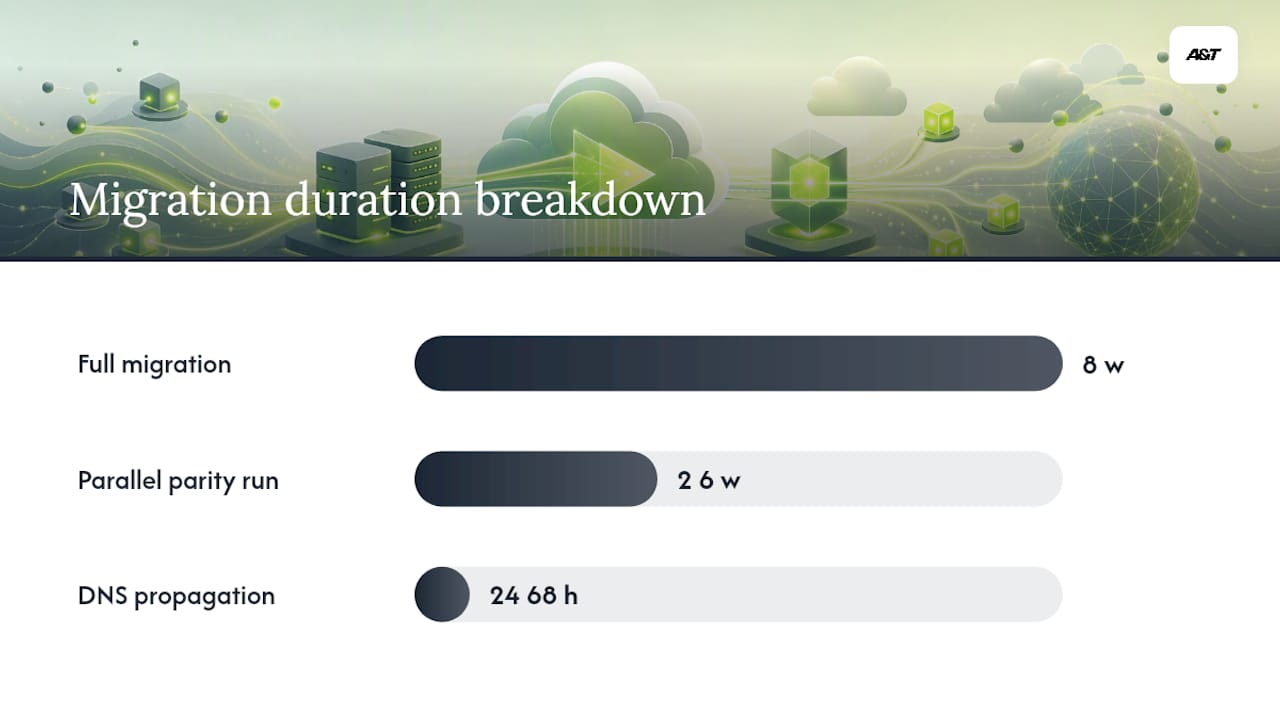
Across our implementations at Atdigiagency, a few patterns repeat regardless of client size or industry.
Recommended team roles for a successful deployment:
- Technical marketer / project owner. Owns the GTM container configuration, tag migration plan, and parity validation. This person bridges analytics and engineering.
- DevOps or cloud engineer. Handles Cloud Run provisioning, DNS configuration, secret management, and monitoring setup.
- Privacy or legal reviewer. Confirms consent propagation logic and PII handling meet the organization's legal requirements before go-live.
- Analytics engineer or QA. Runs parity checks, validates event schemas, and signs off on data quality before client-side tags are retired.
Typical timeline for a mid-size e-commerce migration:
- Week 1–2: Inventory, POC deployment, DNS mapping, initial GA4 parity check
- Week 3–4: Add secondary vendors (Meta CAPI, Google Ads enhanced conversions), run parallel tagging
- Week 5–6: Consent enforcement testing, parity sign-off, retire first client-side vendor tags
- Week 7–8: Full production, monitoring review, retire remaining client-side tags
What usually goes wrong in initial rollouts:
The most common failure point is not technical. Teams underestimate the time required for parity validation and rush to retire client-side tags before the data confirms it's safe. Two to four weeks of parallel running feels slow. Skipping it costs weeks of debugging and, in some cases, real attribution data that cannot be recovered.
The second most common issue is DNS. A CNAME that looks correct in the DNS provider's interface can take 24–48 hours to propagate fully, and teams sometimes start testing before propagation is complete, then conclude the setup is broken when it isn't.
When to bring in an implementation partner
If your team lacks a DevOps engineer comfortable with GCP or AWS, or if your privacy requirements are complex, the POC phase is the right time to bring in outside help. The cost of a scoped implementation engagement is almost always lower than the cost of a botched migration that corrupts historical attribution data.
When we recommend server-side tagging at Atdigiagency
We recommend investing in server-side GTM when a property carries meaningful ad spend, runs more than five vendor tags, or faces measurable data loss from ITP or ad blockers. The ROI case is clearest for e-commerce and lead-gen sites where every conversion signal directly influences automated bidding. Better data means better bids, and better bids mean lower cost per acquisition.
We advise against it for small sites with two or three vendor tags, tight budgets, and no DevOps support. The operational overhead does not pay off at that scale. A well-configured client-side GTM setup with Consent Mode v2 covers most needs for those properties.
The DIY path is viable if you have a cloud engineer on staff and a technical marketer who knows GTM well. If either of those is missing, an agency implementation typically pays for itself within the first quarter of improved attribution data.
Atdigiagency's server-side implementation services
Clean data is the foundation of every paid campaign we run. When attribution gaps are costing you conversions, we fix the measurement layer first.
Atdigiagency offers scoped server-side GTM implementation services: Cloud Run provisioning and DNS setup, GA4 and ad platform tag migration, Meta CAPI and TikTok Events API integration, Consent Mode v2 propagation, and post-launch monitoring configuration. Small POC audits are available before any full engagement, so you can validate fit without committing to a large project. Our Google Ads management team works directly alongside the implementation to confirm that improved conversion signals are feeding your bidding strategies from day one. Reach out to discuss your current tag inventory and we'll scope the right starting point.
Sources
- Client-side tagging vs. server-side tagging - Tag Manager Help
- Why and when to use server-side tagging? | Server-side tagging fundamentals | Google for Developers
- Server-side tagging | Google Tag Manager - Server-side | Google for Developers
- Guidance for Using Google Tag Manager for Server-Side Website Analytics on AWS
- Webkit