
TL;DR:
- Most businesses struggle to accurately measure the true ROI of event advertising due to incomplete tracking and attribution challenges. Proper setup with comprehensive tools, clear goals, and multi-channel attribution models enables more reliable assessment of both direct and indirect campaign results. Continuous analysis and benchmarking against industry standards help optimize future strategies and ensure advertising spend generates meaningful revenue.
You're spending real money on event ads, but at the end of every campaign, the same question lingers: did it actually work? Most business owners and marketing managers can pull impression counts and click-through rates, but translating those numbers into revenue proof is a different challenge entirely. Without a clear tracking system, budget decisions become guesswork, and guesswork costs you. This guide walks you through a practical, repeatable framework for measuring event ad ROI with confidence, from setting up the right tools to interpreting attribution data and benchmarking your results against industry standards.
Table of Contents
- Understanding event ad ROI: Concepts and core formula
- What you need: Tools and setup for accurate event ad tracking
- Step-by-step: Tracking event ad performance across the entire funnel
- Making sense of results: Attribution models and interpreting ROI data
- Benchmarks, troubleshooting, and maximizing your event ad ROI
- Lessons learned: Why "just track conversions" shortchanges true ROI
- Ready to optimize every event ad dollar?
- Frequently asked questions
Key Takeaways
| Point | Details |
|---|---|
| ROI calculation essentials | Use the right formula and data to distinguish between direct revenue and softer outcomes from event ads. |
| Tracking setup matters | Proper UTM tagging, CRM integration, and analytics tools are crucial for accurate ROI measurement. |
| Stepwise full-funnel tracking | Monitor pre-event, in-event, and post-event actions to follow the attendee journey and attribute value clearly. |
| Choose smart attribution | Multi-touch and data-driven attribution reveal more about your true ROI than last-click alone—especially for complex sales. |
| Benchmark and optimize | Compare against industry standards, troubleshoot issues, and use post-event tactics to maximize returns. |
Understanding event ad ROI: Concepts and core formula
Let's start by breaking down what event ad ROI actually means, so you can confidently measure the true value of your campaigns.
Event ad ROI measures the financial return you generate relative to what you spent promoting an event through paid advertising. It sounds simple, but most businesses undercount returns or overcount costs, which skews every decision that follows.
The core formula for event ROI is: (Total Event Value – Total Event Investment) / Total Event Investment × 100. If your event generated $50,000 in value and cost $20,000 to run and promote, your ROI is 150%. That number tells you whether scaling makes sense or whether you need to revisit your strategy.
Where this gets nuanced is the distinction between hard ROI and soft ROI.
- Hard ROI: Direct, measurable revenue. Ticket sales, upsells, closed deals directly tied to the event, and immediate product purchases.
- Soft ROI: Indirect returns that are harder to quantify. New leads added to your pipeline, media coverage, brand lift, social mentions, and long-term relationship building.
Ignoring soft ROI is a mistake many teams make, especially in B2B. A conference that generated 40 qualified leads but zero day-of revenue still delivered enormous value. Those leads have a calculable dollar amount when you apply your average deal size and close rate.
| ROI Type | Examples | How to Quantify |
|---|---|---|
| Hard ROI | Ticket revenue, product sales | Direct revenue tracking |
| Soft ROI | Leads, brand mentions, media | Lead value x close rate |
| Pipeline ROI | Influenced opportunities | CRM attribution reports |
For tracking ad performance accurately, you need all three categories feeding into your final calculation. Factors that skew your numbers include failing to count staff time as an investment, ignoring non-ad promotion costs, or attributing all revenue to the event when some would have happened anyway.
Getting this foundation right before you touch a single dashboard makes analyzing ROI data far more actionable. If you're still getting comfortable with paid advertising concepts, our ad terminology explained resource is a solid starting point.
What you need: Tools and setup for accurate event ad tracking
With the fundamentals in place, you'll need the right tools and setup to collect accurate data from every ad and attendee.
The single biggest reason event ad ROI tracking fails is poor setup, not poor results. Teams launch campaigns, collect a flood of data, and then realize none of it connects cleanly. The fix happens before launch.
Must-have tools for event ad tracking:
- Analytics platform (Google Analytics 4 or similar): Tracks website visits, event page behavior, and conversion goals
- CRM system (HubSpot, Salesforce, or similar): Stores lead data, tracks pipeline stages, and enables revenue attribution
- UTM parameter builder: Creates tagged links for each ad channel so traffic sources are identifiable
- Event registration platform (Eventbrite, custom forms): Captures attendee data that feeds into your analytics and CRM
- Ad platforms (Google Ads, Meta Ads Manager): Provide native conversion tracking when integrated with your site
Using UTM parameters on all event ad links, specifically utm_source, utm_medium, and utm_campaign, is non-negotiable for tracking in Google Analytics, HubSpot, or any registration platform. Without UTM tags, you cannot tell whether registrations came from a Facebook ad, a Google search ad, or a newsletter. Every link in every ad must be tagged. Every one.
| Tool | What It Tracks | Best For |
|---|---|---|
| Google Analytics 4 | Traffic, page events, goal completions | On-site behavior |
| CRM (HubSpot) | Leads, deals, pipeline stages | Revenue attribution |
| Eventbrite / Form tools | Registrations, attendee data | Event-specific conversions |
| Google Ads / Meta Ads | Impressions, clicks, cost per conversion | Ad-level performance |
| UTM Builder | Source/medium/campaign tagging | Cross-channel clarity |
Integrating your event registration platform with your CRM is equally critical. When someone registers via Eventbrite, that contact should automatically flow into HubSpot with a tag identifying which campaign drove them. Manual exports introduce delay and error.
Pro Tip: Before any campaign goes live, run a full test from ad click to registration confirmation. Click every tagged link, complete a test registration, and verify the lead appears in your CRM with the correct source attribution. Missing this step is how campaigns run for two weeks with zero trackable data.
For a broader view of how to connect all these pieces effectively, our guide on measuring campaign results covers the setup process in practical detail.
Step-by-step: Tracking event ad performance across the entire funnel
Once your tech stack is ready, you can start tracking every phase of your attendee journey and pinpoint what works.

Event ads don't operate in a single moment. A prospect might see your Facebook ad, visit your event page, leave, search for your event on Google three days later, and then register. Tracking only the last step hides the full story. Here's how to capture it all.
Step 1: Define measurable pre-event goals. Set specific targets before anything launches: target registrations, cost per registration, target revenue from the event, and pipeline value from new leads. Vague goals produce uninterpretable data.
Step 2: Tag all ad channels and launch real-time dashboards. Every Google Ads campaign, every Meta ad set, every email link gets a unique UTM tag. Build a live dashboard in Google Analytics or your CRM so you can monitor registration volume by source daily, not just after the event ends.
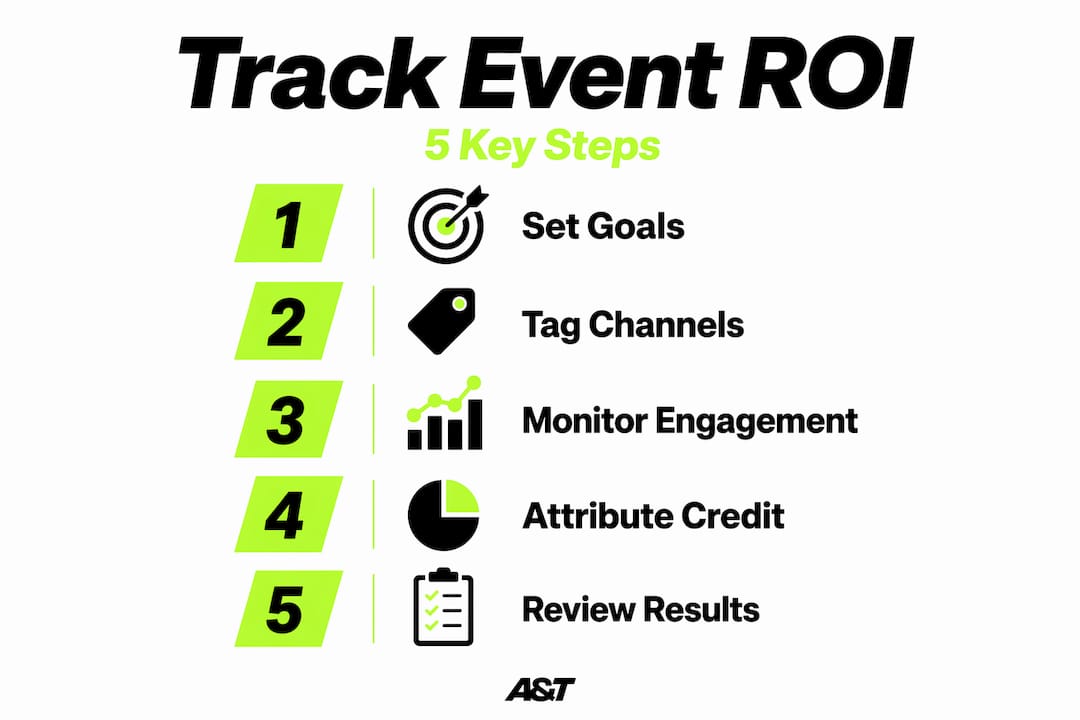
Step 3: Monitor in-event engagement signals. For live events, track digital check-ins, QR code scans at booths, session attendance, and app interactions. These signals indicate quality of engagement, not just headcount. High check-in rates with low follow-up conversion often signal a messaging disconnect.
Step 4: Post-event follow-up and conversion tracking. This is where ROI is often won or lost. Tracking post-event conversions means following leads through the full funnel, from registration to sales conversation to closed deal, alongside sending surveys to measure satisfaction and intent.
Step 5: Sync all data to your CRM for pipeline attribution. Every lead generated should be tagged with the event and the specific ad source. This allows your sales team to see exactly which campaigns are producing opportunities, and it allows you to calculate influenced revenue months later.
A visit-to-registration rate of 21.5% is a strong benchmark for event ad campaigns. If your rate is significantly below this, the issue is usually with landing page messaging or audience targeting, not ad creative.
Pro Tip: For offline events where digital tracking isn't possible, train your team to manually log lead sources on paper or via a mobile CRM app. Import that data within 24 hours of the event ending. Delayed imports mean lost attribution context.
When you're ready to build campaigns designed for measurable outcomes from the start, our resource on measurable ad strategies shows you how Google Display campaigns can be structured for full-funnel visibility.
Making sense of results: Attribution models and interpreting ROI data
Interpreting raw data requires choosing the right scoring model. Here's how to assign ROI fairly across your ad channels.
Attribution is the practice of deciding which ad touchpoints get credit for a conversion. Get this wrong, and you'll cut the campaigns that are actually driving results while doubling down on the ones that just happen to appear last in the journey.
Popular attribution models include single-touch (first-click or last-click), multi-touch (linear, time decay, position-based), and data-driven. Each has real trade-offs for event campaigns.
| Model | How Credit Is Assigned | Best Use Case |
|---|---|---|
| First-click | 100% to first interaction | Brand awareness measurement |
| Last-click | 100% to final touchpoint | Simple campaigns, fast decisions |
| Linear (multi-touch) | Equal split across all touchpoints | Moderate journey complexity |
| Position-based | 40% first, 40% last, 20% middle | Event campaigns with clear intent signals |
| Data-driven | Algorithm-based weighting | High-volume campaigns with rich data |
Last-click attribution is still the default in many platforms because it's simple. But last-click consistently overvalues retargeting and starves top-funnel awareness channels of credit. If your Meta prospecting ad is what introduced someone to your event, but they converted after clicking a Google retargeting ad, last-click gives Meta zero credit. That leads to cutting awareness spend that was actually essential.
Multi-touch attribution is preferred for event campaigns because the decision journey typically spans days or weeks and involves multiple channels. Position-based (40/40/20) works well for events: it honors both the first touchpoint that created awareness and the final one that closed the registration, while acknowledging the middle interactions.
Pro Tip: If you have the budget and volume, run incrementality tests or geo-based lift tests alongside your attribution model. These experiments isolate the actual causal impact of your ads rather than just correlational credit, giving you a much stronger case for scaling specific channels.
One important technical note: iOS privacy changes and browser cookie restrictions have significantly reduced the accuracy of pixel-based tracking. If you're running Meta campaigns, implement Conversions API (CAPI) or server-side tracking to close the data gaps that client-side pixels now miss. This isn't optional for accurate managing ad spend decisions in 2026.
For a deeper look at building campaigns that account for these attribution realities, our campaign ROI guide walks through channel-by-channel structuring.
Benchmarks, troubleshooting, and maximizing your event ad ROI
You've implemented tracking and attribution. Now compare your numbers and fix issues to boost future campaigns.
Knowing your ROI number is only useful when you have context. Here's where your results should land and what to do when they don't.
Industry benchmarks to measure against:
- Overall event advertising ROI typically falls between 200% and 500%, representing a 2:1 to 5:1 return on investment
- Visit-to-registration conversion rate benchmark: 21.5%
- B2B cost per acquisition (CPA): approximately $115 per attendee
- B2C cost per acquisition: approximately $18.50 per attendee
- Post-event email follow-up sequences can yield up to 4,500% ROI in retail contexts
- Roughly 40% of event organizers report difficulty proving ROI, meaning better tracking alone puts you ahead of the majority of competitors
Most common tracking pitfalls and fixes:
- Missing UTM tags on paid links: Audit every ad before launch. Use a UTM spreadsheet to track every tagged URL.
- CRM and analytics not synced: Set up automated integration, not manual export. Test it with a dummy lead before going live.
- Tracking only registrations, not revenue: Assign a lead value based on average deal size and close rate. Track through the full sales cycle.
- Ignoring mobile attribution gaps: Implement server-side tracking for Meta campaigns to recover data lost to iOS restrictions.
- Not tracking post-event pipeline: Set CRM reminders to review event-sourced leads at 30, 60, and 90 days.
Pro Tip: Build a single event ROI dashboard that pulls registration volume, cost per registration, pipeline value, and closed revenue into one view. Seeing the full picture in one place prevents the common mistake of optimizing for the wrong metric. Early registrations at high cost might still produce the highest lifetime value leads.
The 4,500% email ROI figure is worth sitting with for a moment. Post-event follow-up is often treated as an afterthought, but it's where a large portion of actual revenue materializes. A well-sequenced email series to event attendees, timed within 48 hours post-event, dramatically increases conversion from lead to customer.
Check out our advertising checklist to make sure your campaigns cover every critical element, and our ad trends 2026 resource to keep your strategy current as platforms evolve.
Lessons learned: Why "just track conversions" shortchanges true ROI
Having benchmarked your results, it's worth confronting a tough reality: event ROI is more nuanced than it first appears.
We've audited campaigns where the last-click data told a story of one successful ad channel. The team was ready to put all their future budget into retargeting. But when we pulled the multi-touch view, it showed that awareness-stage Meta prospecting ads had touched 70% of the eventual registrations. Cutting them would have killed the pipeline within two months. The single-metric view almost caused a very expensive mistake.
Google Analytics ROI attribution research consistently shows this tension: last-click attribution is simpler and faster for quick decisions, but it's structurally inaccurate for complex buyer journeys. Multi-touch and data-driven models are more accurate, but they require data volume and technical setup that not every small team has available.
Here's our honest take: if you don't yet have the volume for data-driven attribution, use position-based multi-touch as your default for event campaigns. It's a reasonable middle ground. Don't let the perfect be the enemy of the measurable.
The other lesson we return to often is the time horizon problem. B2B event leads rarely convert in the same quarter. A lead from a trade show in March might close in September. If your attribution window is 30 days, you're reporting that event as zero ROI when it actually generated your best Q3 deals. Extending your lookback window to 6 to 12 months for B2B campaigns isn't just a best practice. It's the only accurate way to measure reality.
Single-metric thinking leads to resource decisions that feel logical in the moment but hollow out your pipeline over time. Invest in maximizing campaign ROI with a full-funnel view, and you'll make budget calls that actually hold up three months later.
Ready to optimize every event ad dollar?
If these frameworks resonate but the execution feels like a heavy lift, that's exactly the problem we solve. At A&T Digital Agency, we build and manage paid ad systems for businesses that need measurable results from every dollar spent, not just activity reports. From structuring your Google Ads management campaigns with full conversion tracking to running Meta Ads management with CAPI integration and multi-touch reporting, we handle the technical setup and ongoing optimization so you can focus on running your event. If you're ready to finally answer "is our event ad spend paying off?" with real data, let's talk.
Frequently asked questions
What is a good ROI for event advertising?
A strong event ad ROI typically falls between 200% and 500%, or a 2:1 to 5:1 return ratio, though results vary significantly by industry and event type.
How do I track event ad results if most attendees are offline?
Use manual lead tagging at the event and import that data into your CRM within 24 hours; offline events require manual CRM integration to track each lead's funnel status and eventual attribution.
Which attribution model is best for event ad ROI?
Multi-touch attribution is usually best for events because it captures both awareness and conversion value across the full buyer journey, though single-touch is a useful quick reference for simpler campaigns.
What are the most common mistakes when tracking event ad ROI?
Missing UTM links on paid ads and focusing only on last-click attribution are the most damaging errors, as they distort which channels actually drove registrations and revenue.
How long should I track attendees after an event?
For B2B campaigns, track event-sourced leads for 6 to 12 months after the event, since longer sales cycles mean conversions often happen well after the event date.