
The winning approach combines lead-optimized video campaigns with native lead forms and Demand Gen or Video Action formats, then routes viewers through watch-depth tiers instead of asking for a demo on the first click. Formats and audience layering matter, but conversion tracking matters more. Expect to spend through an initial learning phase before the algorithm finds your real buyers.
TL;DR:
- Using lead forms with native YouTube ads reduces the path to submission by about 67%, but these leads often indicate lower intent than landing page visitors.
- Building audience tiers based on watch depth, from 25% to 75%+ watched, significantly improves lead quality by matching offers to viewer intent.
- Campaign success depends more on tracking and routing, with correct setup and segmentation, rather than format or creative alone.
- Proper integration with CRM, prompt follow-up, and offline conversion tracking are essential to accurately measure and optimize lead value.
- Scaling campaigns should be incremental, with creative refreshes every few weeks and careful adjustment of audience sequencing to maintain lead quality.
Table of Contents
- What YouTube Ad Format Actually Generates Leads?
- How Do You Build Audience Tiers That Route Viewers Correctly?
- What Creative and Offer Structure Converts Viewers Into Leads?
- How Do You Set Up a YouTube Lead Campaign Correctly?
- How Should You Measure YouTube Lead Campaign Performance?
- What Are the Best Levers for Scaling Without Losing Lead Quality?
- How Atdigiagency Applies This Playbook for Clients
- What Legal and Privacy Rules Apply to YouTube Lead Ads?
- How Do You Connect YouTube Leads to Your CRM and Follow-Up System?
- Where to Read More on YouTube Lead Campaigns
- The Real Gap in Most YouTube Lead Advice
- Sources
What YouTube Ad Format Actually Generates Leads?
Format choice depends on where the viewer sits in your funnel, not which format looks best in a case study. Native lead form ads cut the path from ad click to submitted lead by about 67% compared with sending traffic to a website, and they can capture a lead in under 10 seconds. That speed is the trade-off: form-fill leads tend to run lower intent than someone who clicked through and filled out a landing page, so treat them as a separate lead source in your CRM, not a duplicate of your website conversions.
Demand Gen has effectively replaced Video Action Campaigns as Google's primary tool for this job, and the shift is not cosmetic. Advertisers who upload both video and image assets to Demand Gen see a notable increase in conversions at a similar cost per action compared with those running video assets alone. Video Action Campaigns still exist and still work, using skippable in-stream and in-feed placements with CTA overlays, but Demand Gen's multi-format reach across YouTube, Discover, Gmail, and the Display Network gives it the edge for most lead campaigns launched today.
Quick format rules by funnel stage:
- Cold prospecting: Demand Gen with mixed video and image creative, or skippable in-stream for longer explainer content.
- Mid-funnel nurture: In-feed and Shorts to keep your brand visible to people who already watched once.
- Bottom-funnel push: Bumpers as reminder creative alongside a lead form CTA.
- High-consideration offers: Skippable in-stream paired with a landing page instead of a native form, since the extra friction filters for real intent.
How Do You Build Audience Tiers That Route Viewers Correctly?
Most advertisers waste budget by asking a viewer who watched three seconds of your ad to book a sales call. The fix is tiering by watch depth, then matching the offer to the tier. This single change is one of the more reliable levers for improving lead quality on YouTube, particularly for consultative or high-ticket offers.
Build the system in three layers:
- Tier 1, engaged viewers (25% or 30 seconds watched): Retarget with a low-commitment offer, a lead magnet, a free guide, or a short quiz.
- Tier 2, high-intent viewers (50% watched): Push a mid-commitment CTA, a webinar registration or a case study download.
- Tier 3, sales-ready viewers (75%+ watched or full completion): Serve a direct demo or consultation booking CTA.
Build these lists inside Google Ads through YouTube remarketing based on watch behavior, layered with Custom Intent audiences built from search terms your buyers actually use and in-market segments that match your category. Upload your existing customer list through Customer Match to exclude current clients from prospecting and to build lookalike-style targeting for new ones.
Keep prospecting frequency capped around 2 to 3 views per week per user to avoid burning through cold audiences too fast. Remarketing tiers can run higher frequency since you're talking to warmer viewers who already raised a hand.
Pro Tip: Don't skip Tier 1. Advertisers who jump straight from cold ad to demo request see far more no-show bookings than those who warm viewers up with one low-friction step first.
What Creative and Offer Structure Converts Viewers Into Leads?
The first five seconds decide whether your budget was well spent. A hook has three jobs: identify the viewer ("Running a clinic with more no-shows than you'd like?"), state the problem in plain language, and create just enough tension that skipping feels like leaving something unresolved.
Everything after that hook needs to match what the viewer expects to see next. Your CTA overlay, end screen, and landing page headline should all use the same language, the same offer, and ideally the same visual style. A mismatch between ad copy and landing page copy is one of the fastest ways to tank a qualified view rate.
Structure your offers as a ladder rather than a single ask:
- Low commitment: downloadable guide, checklist, or short assessment.
- Mid commitment: webinar, workshop, or product walkthrough registration.
- High commitment: demo booking, consultation call, or quote request.
Build a small asset library rather than one hero video: a 15 to 30 second bumper for reminder creative, a 30 to 60 second in-feed piece for discovery, and a longer 90 second or more skippable in-stream version for viewers ready to sit through a real explanation. Landing pages need short forms, three fields or fewer, fast mobile load speed, and message match with the ad. Reviewing high-converting ad creative examples before you shoot anything will save you a reshoot later. A strong CTA does more conversion work than a bigger budget.
How Do You Set Up a YouTube Lead Campaign Correctly?
Getting the setup right the first time saves weeks of noisy data. Follow this order inside Google Ads:
- Choose the Leads objective, not Awareness or Consideration, when you create the campaign.
- Install conversion tracking before launch, including view-through conversions, GA4 linked to Google Ads, and a scheduled CRM export for native lead-form submissions.
- Start bidding on Maximize Conversions to feed the algorithm data while volume is low.
- Switch to Target CPA once you've logged 30 or more conversions, which is roughly the threshold practitioners use to trust the signal.
- Set your initial daily budget at 10 to 15 times your Target CPA. If your Target CPA is $40, budget $400 to $600 per day to escape the learning phase faster instead of starving the campaign and stretching it out for months.
- Decide lead form vs landing page per ad group, not per campaign, since intent differs by audience tier.
- Schedule a daily CRM sync so sales follows up on native form leads within hours, not days.
A campaign that spends under 5 times its Target CPA per day rarely gathers enough conversion volume to leave the learning phase within a reasonable window, according to setup guidance from Groas.
Skipping step 2 is the most common failure. Without CRM export scheduling, native form leads sit unclaimed and your sales team never knows the campaign is working.
How Should You Measure YouTube Lead Campaign Performance?
Cost per lead is the wrong headline metric. It tells you what you paid, not what you got. Track these instead:
- Cost per meeting held, not cost per booked call, since no-shows distort the raw number.
- SQL rate by source, comparing native form leads against landing-page leads separately, since form leads run lower intent by design.
- Qualified view rate, the share of viewers who hit your engagement threshold before converting.
- View-through conversions, which capture people who saw the ad, didn't click, and converted later through search or direct traffic.
Link GA4 to Google Ads before launch and upload offline conversions from your CRM once leads move to SQL or closed status. This closes the loop between ad spend and actual pipeline, not just form fills. Set your attribution window to match your sales cycle. A 7-day click window undercounts YouTube badly for anything with a consideration period longer than a week.
Give the campaign 2 to 4 weeks before judging it. YouTube's influence often shows up in branded search and direct traffic that a shorter window won't catch, which is exactly why raw CPL misleads advertisers who pull the plug too early.
What Are the Best Levers for Scaling Without Losing Lead Quality?
Scale in small steps.
- Refresh creative every 3 to 4 weeks for prospecting campaigns, since frequency fatigue sets in faster on YouTube than on static formats.
- Run A/B tests on hooks and CTAs one variable at a time so you know what actually moved the number.
- Review placement reports monthly and exclude channels or apps generating clicks with no downstream conversions.
- Adjust sequencing as volume grows, pushing warmer tiers less frequently once your remarketing pools get large enough to support it.
Pro Tip: If your CPA holds steady through two consecutive budget increases, you're not maxed out yet. If it jumps more than 20% right after a bump, pull back and let the algorithm settle before pushing again.
How Atdigiagency Applies This Playbook for Clients
We build lead-optimized YouTube systems around the same three pieces every time: a tiered asset library matched to watch depth, native lead forms paired with Demand Gen for reach, and a CRM close-loop so sales knows exactly which video sourced which lead. No guesswork, no vanity metrics.
Should you run this yourself or bring in help? Ask honestly:
- Do you have someone who can build and label conversion actions correctly in Google Ads?
- Can you produce three or more creative variants without stalling production?
- Do you have a CRM sync ready before day one, or will leads sit unclaimed?
If any answer is no, a specialized team closes that gap faster than trial and error.
What Legal and Privacy Rules Apply to YouTube Lead Ads?
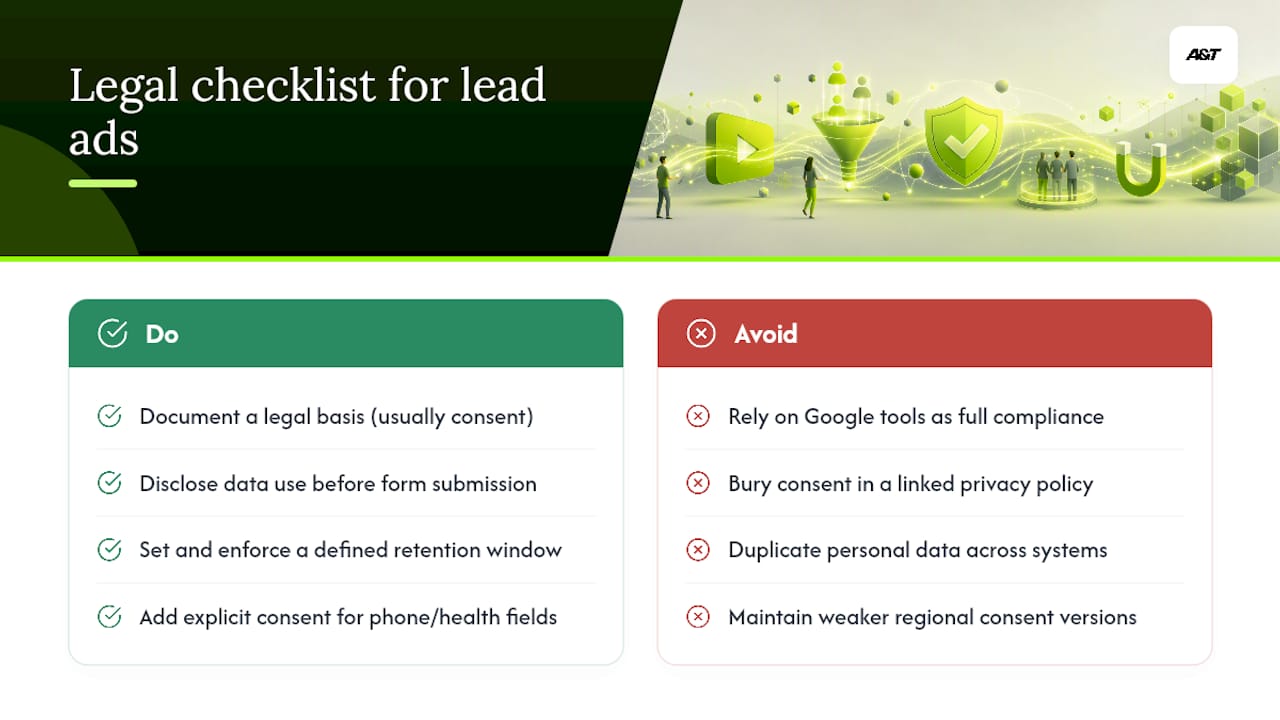
Native lead forms collect personal data directly inside YouTube, which puts you squarely under data protection law the moment you launch, not just when a lead lands in your CRM. Under GDPR, that means a documented legal basis for collecting the data, typically consent, and clear disclosure of what you'll do with it before the form submits. Under the CCPA, California residents need visibility into what's collected and a real mechanism to request deletion.
Google Ads gives you the technical means to capture consent and disclose data use inside the lead form flow. It doesn't absolve you of building a compliant process around what happens after submission. If your form asks for phone numbers or health-adjacent details, particularly relevant if you serve telehealth or wellness clients, add explicit consent language before the field, not buried in a linked privacy policy nobody reads.
Retention policy matters as much as collection. Set a defined window for how long unconverted leads stay in your CRM before deletion, and make sure your export automation doesn't quietly duplicate personal data across spreadsheets, ad platforms, and sales tools with no single source of truth. If you run campaigns across the EU, the UK, and California simultaneously, build your consent language to the strictest applicable standard rather than maintaining three versions and hoping the right one shows up in the right region. When in doubt on a specific clause, that's a conversation for legal counsel, not a marketing checklist.
How Do You Connect YouTube Leads to Your CRM and Follow-Up System?
A lead sitting in a spreadsheet for two days is a lead you probably lost. Native lead-form submissions need to sync automatically, ideally through Google Ads' built-in CRM integrations or a middleware tool like Zapier, directly into your CRM within minutes of submission, not through a manual weekly export.
Tag every lead by source at the point of entry: native form, landing page, tier of origin, and which creative asset drove the click. Without that tagging, you'll never be able to answer the question that actually matters, which tier and which creative produced sales-ready leads versus form-fillers who never respond.
Set automated follow-up sequences that match the commitment level of the original offer. A lead who downloaded a checklist gets a nurture email sequence. A lead who booked a demo through a Tier 3 CTA gets a phone call within the hour, not a generic autoresponder. Speed to first contact correlates directly with SQL conversion rate for high-intent form submissions, since these viewers already showed real interest by watching most of the ad.
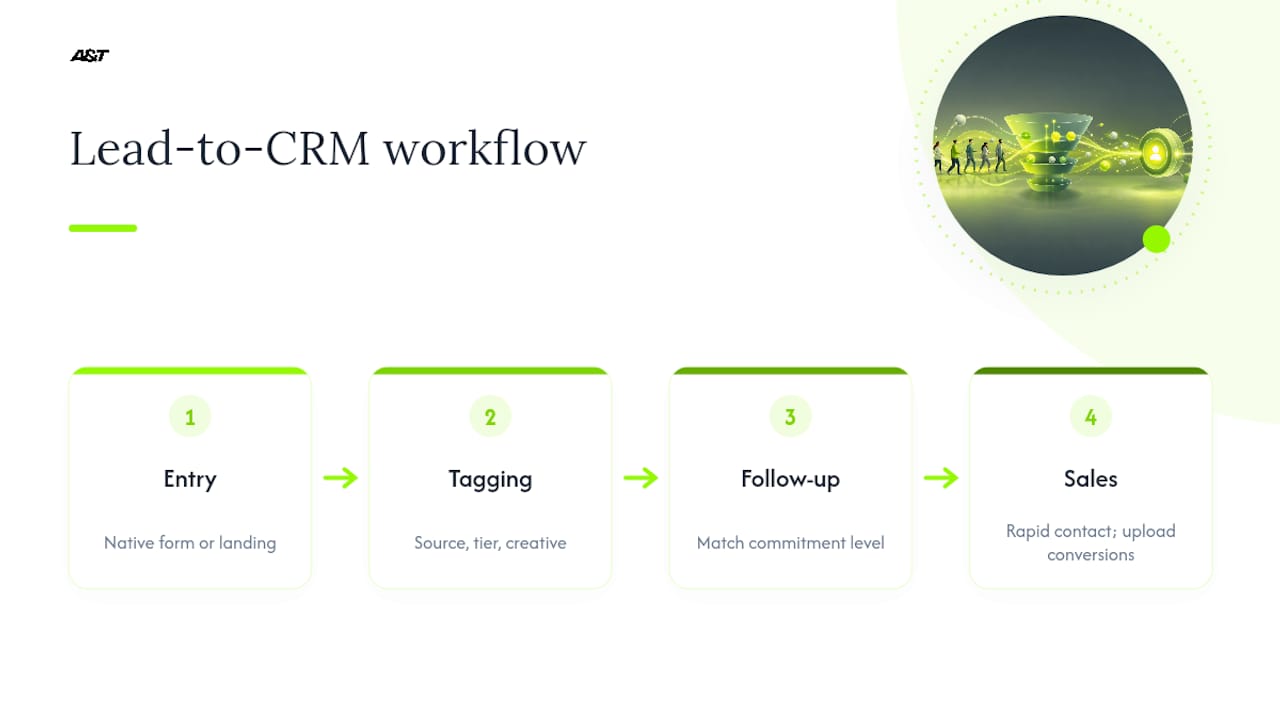
Upload offline conversion data back into Google Ads once a lead becomes an SQL or closes as revenue. This is the step advertisers skip most often, and it's the one that actually tells the algorithm which leads were worth acquiring, not just which ones were cheap to generate.
Where to Read More on YouTube Lead Campaigns
For the technical details behind this playbook, go directly to the source. Google's own documentation covers native lead form setup and the Demand Gen migration in detail, including format availability and billing by surface. The Video Action Campaigns support page covers legacy format behavior still relevant to accounts mid-transition. Groas's setup guide walks through bidding progression in more depth than fits here.
The Real Gap in Most YouTube Lead Advice
Most advice on YouTube lead generation treats format selection as the whole game. Pick Demand Gen, add a lead form, done. That misses the actual lever: almost every underperforming YouTube lead campaign we've seen fails at routing, not targeting. Advertisers ask a cold viewer for a demo booking on the first impression, then blame the platform when the SQL rate craters.
The Demand Gen migration matters, and the 20% conversion lift from mixed video and image assets is real, but it's a tactical upgrade, not a strategy. The strategy is watch-depth tiering paired with an offer ladder that respects how much attention someone actually gave you. That's the piece conventional advice skips, probably because it's less exciting to write about than a new campaign type.
If you're starting from scratch, prioritize the routing system before you touch creative polish. A mediocre video with correct tiering will outperform a beautiful video that asks for too much too soon. Fix the ask before you fix the ad.
— Ann
Ready to build a YouTube lead system with correct tracking, tiering, and CRM integration from day one? Atdigiagency's Google Ads management team builds exactly this kind of system for clients across healthcare, retail, and entertainment, without the extra meetings.
Sources
- YouTube lead form ads (Google Ads support)
- How To Set Up YouTube Ads For Lead Generation: Step-By-Step Setup Guide (Groas)