
Facebook ads not spending usually comes down to one of two culprits: a billing or account spending limit blocking delivery, or a Delivery column status flagging a review, learning, or auction problem. Check Billing & Payment first, then read the exact message in the Delivery column next to each ad. If it says "In Review," wait. If it says anything about spending limits, a rejected ad, or a payment failure, act immediately.
TL;DR:
- Most Facebook ad spend issues stem from billing problems or account spending limits that prevent delivery, especially on new accounts.
- Setting bid or cost caps too low relative to market prices can silently block ad auctions, leaving campaigns underfunded.
- Narrow targeting, excessive exclusions, or overlapping ad sets can restrict audience size and halt delivery.
- Insufficient conversion tracking signals or pixel firing issues can cause Meta's algorithm to withhold spending to avoid inefficient spending.
- Starting troubleshooting with a billing check and reviewing the Delivery column messages often resolves the majority of no-spend campaigns rapidly.
Table of Contents
- Why Are My Facebook Ads Not Spending? The Root Causes
- How Do You Fix Facebook Ads That Aren't Spending?
- How Much Should You Spend While Facebook Ads Ramp Up?
- What Should You Check in the Next 15 to 60 Minutes?
- How Agencies Diagnose No-Spend Accounts
- Fix Facebook Ads Not Spending: What Actually Matters
- Get Your No-Spend Account Diagnosed and Fixed
- Sources
Why Are My Facebook Ads Not Spending? The Root Causes
Zero spend rarely has a single cause. It's almost always one of five diagnostic buckets, and figuring out which one you're in saves you from tweaking the wrong lever for three days straight.
Hard blockers stop delivery cold. A declined card, an account spending limit, or a disapproved ad will keep your campaign at $0 no matter how good your targeting is. These show up clearly in Ads Manager, but only if you know to look at the Delivery column instead of the green "Active" toggle. New ad accounts are especially prone to this. Limited billing history often triggers stricter spending caps and slower pacing until Meta trusts the account with a payment track record.
Auction blockers are quieter. Your ad is live, your budget is fine, but you're losing every auction because your bid or cost cap sits below what the market actually charges for that audience right now. Meta won't spend money it can't win with.
Audience blockers happen when you've narrowed your targeting so tightly, or stacked so many exclusions, that Meta simply can't find enough people to serve ads to profitably. Overlapping ad sets targeting nearly the same audience will also cannonize each other into low delivery.
Signal blockers are about tracking, not targeting. If your pixel isn't firing, or you don't have enough conversion events flowing in, Meta's algorithm has nothing to optimize toward. Add in iOS attribution limits, and the system may be flying half-blind, throttling spend as a defensive measure.
Scheduling and pacing blockers are the most overlooked. A lifetime budget spreads spend across the whole flight, so daily spend can look artificially low even when everything else is healthy. Ad scheduling restricted to certain hours, or a pacing algorithm smoothing delivery across the day, can also make spend look stalled when it's actually on track.
Here's the quick-reference map:
- Hard blockers: billing failures, account spending limits, disapproved ads
- Auction blockers: bid or cost caps set too low, high competition in the auction
- Audience blockers: too-small estimated reach, exclusion stacking, ad set overlap
- Signal blockers: missing pixel, insufficient conversion events, iOS attribution gaps
- Pacing blockers: lifetime budgets, restrictive ad scheduling, natural day-long pacing
How Do You Fix Facebook Ads That Aren't Spending?
Work this list in order. Each step either fixes the problem or rules out a cause, and the sequence is built to catch the most common issues first.
-
Check Billing & Payment immediately. Go to Ads Manager, open Billing, and look for a declined charge, an expired card, or an outstanding balance. This single check resolves a large share of no-spend cases, since payment failures and account-level spending limits are the most frequent root cause, particularly on newer accounts.
-
Read the Delivery column message, then drill into ad-level status. Don't trust the "Active" toggle. Click into the campaign, then the ad set, then the individual ad, because each level can carry a different status. A campaign can say "Active" while every ad inside it says "Ad Set Off" or "In Review." Meta's own Delivery insights documentation exists specifically because this confusion is so common.
-
If billing is clean, test for an auction constraint by applying local keyword research strategies to improve your ad targeting and lead generation. Remove any bid cap or cost cap you've set and switch the ad set to Lowest Cost bidding. Let it run for a day. If spend picks up, your original cap was set below the market's clearing price for that audience.
-
Temporarily raise the budget to test capacity. A budget that's too small relative to your target cost per result can look like a delivery problem when it's really a math problem. Bump the daily budget for 24 to 48 hours purely as a diagnostic, then dial it back once you understand your real cost per result.
-
Broaden your audience if reach is thin. Check the estimated audience size Meta shows you at the ad set level. If it's tiny, or if you've layered five interest exclusions on top of a narrow lookalike, you've probably squeezed the audience below a workable threshold.
-
Check for ad set overlap. If you're running three ad sets that all target the same 35 to 44 age range with overlapping interests, they're bidding against each other in the same auction. Consolidate into one ad set, or move to Campaign Budget Optimization (CBO) and let Meta allocate spend across audiences automatically.
-
Verify your pixel is actually firing. Open Events Manager and confirm recent, real events are landing, not just test events from months ago. A dead or misconfigured pixel starves the algorithm of the signal it needs to spend confidently. If browser-based tracking looks incomplete, especially after iOS privacy changes, set up the Conversions API to send server-side event data as a backup signal.
-
Review ad scheduling and placement exclusions. If you've restricted delivery to certain hours or cut out placements like Audience Network, you've shrunk your own inventory. Loosen these temporarily to see if spend recovers.
-
Check whether a lifetime budget is the reason daily spend looks low. Lifetime budgets are designed to smooth spend across the whole campaign flight, so a single slow day isn't necessarily a red flag. Confirm the total delivered against the lifetime target before assuming something's broken.
-
Note any recent edits. Changing budget, creative, or targeting resets the learning phase and can cause a temporary dip in delivery while Meta relearns. If you edited something in the last 24 to 48 hours, give it time before troubleshooting further.
Pro Tip: Run the Lowest Cost test before anything else once billing is confirmed clean. It's the fastest way to tell whether your ad simply isn't competitive in the auction, and it takes about a day to get a clear read.
How Much Should You Spend While Facebook Ads Ramp Up?
Low spend isn't automatically a problem. Sometimes it's the algorithm doing exactly what it's supposed to do while it learns. The trick is knowing the difference between "this is normal" and "something is actually broken."
Meta generally needs roughly 50 optimization events per ad set per week to exit the learning phase and stabilize delivery, according to budget guidance from WhatnWhy. If your daily budget can't realistically produce 50 conversions across seven days, your ad set may sit in "Learning Limited" indefinitely, delivering slowly and inconsistently. A practical rule of thumb is that your daily budget should be enough relative to your target cost per acquisition to enable effective learning, so the algorithm has room to find enough qualifying events without starving the campaign.
Here's how that translates into real-world budget ranges for U.S. advertisers:
| Objective | Typical daily budget | Notes |
|---|---|---|
| Testing new creative or audiences | $10/day | Short bursts, 3–5 days per test |
| Lead generation | $20–50/day | Needs enough volume for usable lead quality signals |
| Ecommerce scaling | $30+/day | Scale in increments once ROAS is stable |
| Retargeting warm audiences | $5–15/day | Smaller pool, typically higher conversion rate |
When you're testing something new, a short burst at a slightly higher daily budget often surfaces a clear signal faster than a trickle spread over weeks. Big jumps reset the learning phase and can tank performance right when you're trying to scale.
One overlooked opportunity: if your total budget is limited, retargeting warm audiences frequently delivers the best return per dollar, since the pool is smaller and already primed to convert. Reference our pacing guide for SMB marketers for a deeper look at how Meta smooths spend across lifetime versus daily budgets.

What Should You Check in the Next 15 to 60 Minutes?
If you're staring at a $0 spend campaign right now, work through this list before you touch anything else. It's built for speed, not thoroughness.
- Open the Billing page first. Look for a declined card, expired payment method, or outstanding balance flag.
- Scan the Delivery column across every active ad. Note any message besides "Active," especially "In Review," "Learning Limited," or anything mentioning a spending limit.
- Drill into ad-level status, not just campaign-level. A parent campaign can look fine while the actual ad underneath is disapproved.
- Check your account spending limit under Billing settings. It's separate from your payment method and easy to miss.
- Screenshot everything before you make changes: the Delivery message, the billing status, the ad set's audience size, and a timestamp. This turns a 20-minute support call into a five-minute one if you need to escalate.
- Check community forums or Meta's status updates to rule out a platform-wide outage before you assume the problem is unique to your account.
Roughly 50 optimization events per ad set per week is the threshold Meta's system needs to stabilize delivery, so if your event volume is nowhere close to that, don't panic. That's a budget or tracking conversation, not necessarily a broken account. Fast triage almost always starts the same way: billing first, then Delivery column, then auction and audience constraints, in that order.
How Agencies Diagnose No-Spend Accounts
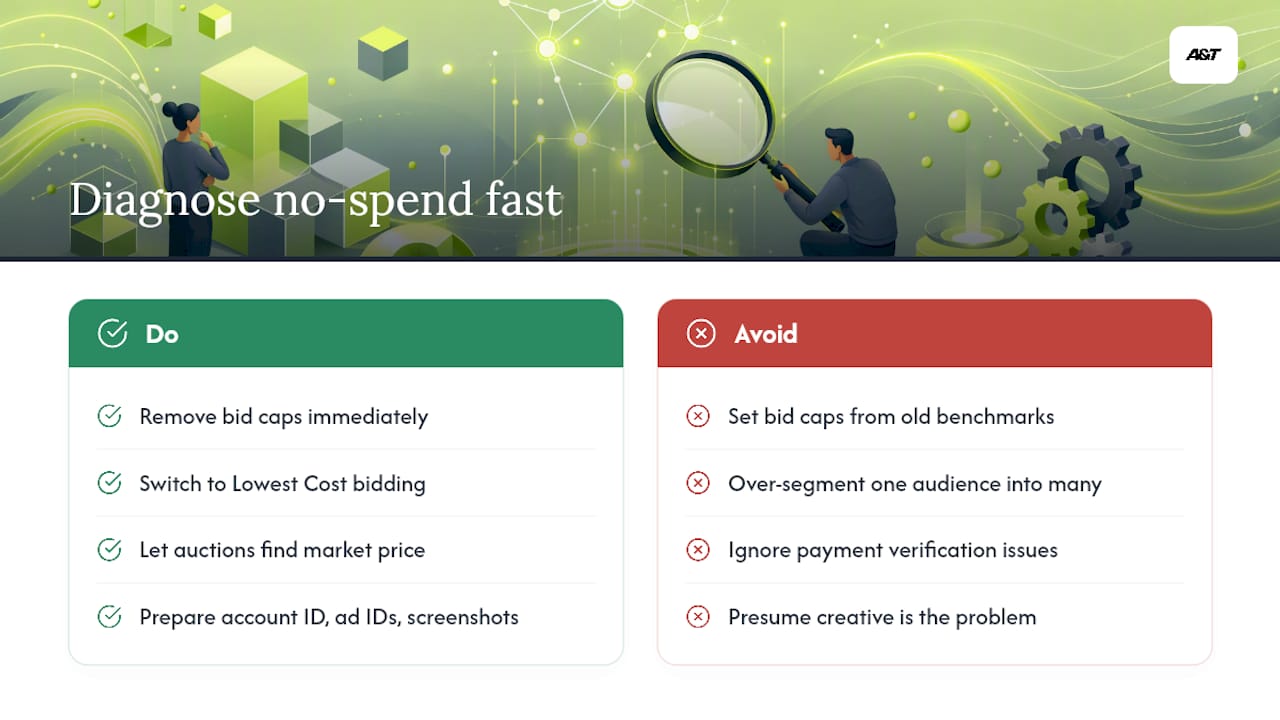
An anonymized pattern we see often: a new ecommerce account launches, sets a bid cap based on a competitor's benchmark, and watches spend crawl to a stop within 48 hours. The fix isn't creative. It's math. Removing the bid cap, switching to Lowest Cost, and letting the auction find the real market price restores full delivery within a day, often with the exact same ad creative that had been sitting dormant.
That pattern repeats constantly. New accounts hit payment verification snags before their first dollar even spends. Established accounts hit self-inflicted bid caps set too conservatively. Growing accounts over-segment, splitting one workable audience into four ad sets that compete against each other and starve every one of them of volume.
The account wasn't broken. The bid cap was set for a market that no longer existed. Once we removed it, the same creative that had been stuck for four days spent through its full daily budget by noon.
If you're preparing to bring in outside help, have your ad account ID, the specific ad IDs that aren't spending, a note on anything changed in the last week, and screenshots of the Delivery column ready. That prep alone can cut diagnosis time from a full day to under an hour.
Fix Facebook Ads Not Spending: What Actually Matters
Most troubleshooting guides bury the lede. They walk you through ten possible causes in no particular order, when the real fix, in the overwhelming majority of cases, is billing or a bid cap. Start there. Everything else is a distant second.
The conventional advice oversells pixel and audience fixes because they sound more technical and more interesting to write about. In practice, a five-minute billing check resolves more no-spend tickets than a full tracking audit ever will. Save the deep signal work for when the obvious stuff is already ruled out.
If there's one habit worth building, it's this: stop trusting the "Active" toggle. Read the actual Delivery column message every time. That single discipline will save you more wasted hours than any targeting tweak, and it's the first thing worth checking before you touch your budget, your bids, or your audience at all.
— Ann
Get Your No-Spend Account Diagnosed and Fixed
Troubleshooting a stalled account yourself works, until it doesn't, and you're three hours deep into Ads Manager with no clearer answer than when you started. Atdigiagency runs Meta Ads management as a hands-on diagnostic and fix, not a generic audit: we reconcile billing issues, pull apart bid strategy mistakes, rebuild broken pixel and Conversions API setups, and triage campaign structure so spend resumes without guesswork.
Before reaching out, gather your ad account ID, the specific ad IDs affected, a note on any recent changes, and screenshots of the Delivery column messages. That prep lets us move straight into fixes instead of spending the first call gathering basics.
If your account has been stuck at $0 spend for more than a day, get a Meta Ads management review started and find out exactly what's blocking delivery.
Sources
- Your campaign hasn't delivered enough since it started — Meta Business Help
- Daily budget for Facebook ads — WhatnWhy (2026)
- Ads Active but Not Spending? The Zero-Delivery Fix for Meta and Google — AdControlCenter