
Pick one of three structures for your next multi-event push: a series (short, sequenced days building toward one offer), a sprint (a compressed, high-intensity push with a single hard deadline), or a festival (a multi-track, multi-day program with parallel content lanes). Choose a series when you have one audience and one story to tell across three to five touchpoints. Choose a sprint when your team is small and you need urgency more than nuance. Choose a festival when you're running multiple tracks for different segments, and you can support heavier reporting overhead.
Every one of these structures fails without three things: a single campaign object that anchors reporting, a clean parent/child mapping so results roll up instead of scattering across dozens of disconnected records, and a KPI set defined before launch, not after. We'll cover all of it, including exactly how to build this in Salesforce and HubSpot, but here's the essential checklist before you touch a single tool:
- A grandparent (or "initiative") record that represents the whole campaign, not any single event.
- Parent campaigns for each channel or program (webinar series, paid social push, in-person track).
- Child campaigns for individual tactics, assets, or event days.
- A locked naming convention and a small set of required custom fields.
- A defined KPI at each level, so you're not eyeballing performance in a spreadsheet three weeks later.
Key Takeaways
A multi-event campaign works when a single grandparent record, a locked naming convention, and level-specific KPIs replace ad hoc tracking across disconnected campaigns.
| Point | Details |
|---|---|
| Choose one structure | Pick series, sprint, or festival based on audience size, resources, and reporting complexity you can support. |
| Build the hierarchy first | Set up grandparent, parent, and child campaigns before creating any assets or schedules. |
| Lock naming and fields | Enforce Program Type, Funnel Stage, Owner, and Landing Page URL as required fields at creation. |
| Map KPIs by level | Track revenue and pipeline at the grandparent level, channel performance at the parent level, asset performance at the child level. |
| Avoid time-based parents | Use date fields instead of quarterly or annual parent campaigns to prevent yearly rebuilds. |
| Outsource when it's faster | Atdigiagency builds and manages this exact structure for clients who need launch-ready reporting without the internal setup time. |
Table of Contents
- Multi-Event Campaign Structure Examples: How to Set One Up From Scratch
- What Is the Grandparent, Parent, and Child Campaign Model?
- What Naming Conventions Work Best for Multi-Event Campaigns?
- How Should You Plan a Promo Calendar for a Multi-Event Rollout?
- Which Channels Should Carry Each Phase of a Multi-Event Campaign?
- How Do You Track Attendees Through Registration and Replay?
- What KPIs Should You Track at Each Campaign Level?
- Which Multi-Event Templates Should You Copy for Your Next Campaign?
- How Does Atdigiagency Structure Multi-Event Campaigns for Clients?
- When Should You Choose Simplicity Over a Complex Campaign Structure?
- Ready to Outsource Your Multi-Event Campaign Setup?
- Frequently Asked Questions
- Sources
Multi-Event Campaign Structure Examples: How to Set One Up From Scratch
Start with the record, not the calendar. Before you write a single email or design a landing page, create the initiative record that everything else will attach to. This becomes your grandparent campaign, and it needs three things at minimum: a master landing page URL, a defined date range, and a small set of required metadata fields (more on those in the next section).
The build order matters. Do it out of sequence and you'll spend weeks retrofitting reporting later.
- Create the initiative (grandparent) record. Name it once, using your locked naming convention, and set the overall campaign dates.
- Define your Parent/Child mapping. Decide which channels or programs get their own parent campaign (email, paid social, webinar series, in-person days) and which tactics sit underneath as children.
- Set required custom fields at creation. Program Type, Funnel Stage, Owner, and Landing Page URL should be mandatory, not optional, on every child record.
- Build assets and UTMs before scheduling anything. Every asset gets a UTM tied to its exact child campaign, never a generic one shared across the whole initiative.
- Schedule per-day or per-phase messaging. Map each send, post, or ad flight to its position in the funnel, not just a date on a calendar.
- Connect integrations. Link your CRM, analytics platform, ad accounts, and (if relevant) your webinar platform so status changes flow automatically instead of through manual updates.
AEvent's step-by-step tutorial for building a 3-day multi-event campaign shows this in practice: create the main event first, then add each additional day as its own record with its own messaging and schedule, all still rolling up to the same campaign. That's the series structure in miniature.
Your integrations checklist should cover:
- CRM linking, so every campaign member record updates status automatically (registered, attended, converted).
- Analytics tracking, with UTMs mapped one-to-one against child campaigns.
- Ad account connections, so spend data flows back to the same reporting object.
- Webinar or event platform sync, if you're running live sessions.
- Automation triggers for reminder emails, replay follow-ups, and lead scoring changes.
Assign one owner for the grandparent campaign and separate owners for each parent, but require sign-off from the grandparent owner before a new child campaign gets created. That single approval gate stops the sprawl that kills reporting six months in.
Pro Tip: Treat the grandparent campaign record as your single source of truth. If a stat doesn't match what's in that record, the record is right and the spreadsheet is wrong. Fix the process, not the number.
What Is the Grandparent, Parent, and Child Campaign Model?
A three-tier hierarchy, where the grandparent represents your overall initiative, the parent represents a channel or program, and the child represents an individual tactic or asset, gives you clean roll-up reporting without forcing every stakeholder to dig through raw child-level data. This is the model Salesforce natively supports through its Parent Campaign field, and it's become the default operational pattern for teams running more than a handful of events per quarter.
The benefit isn't cosmetic. When your finance team asks "what did this quarter's event push actually generate," you want one number pulled from one record, not six analysts reconciling six spreadsheets.
| Level | Purpose | Example Field Value | What to Measure |
|---|---|---|---|
| Grandparent | Represents the entire initiative or program | "2026 Q2 Product Launch Series" | Influenced revenue, total opportunities, pipeline generated |
| Parent | Represents a channel or program within the initiative | "Q2 Launch – Webinar Track" | Registrations, MQLs by channel, cost per channel |
| Child | Represents an individual tactic, asset, or event day | "Q2 Launch – Webinar Day 2 – Ad Set A" | Click-through rate, open rate, cost per lead |
Platform specifics differ, and this matters more than most teams expect:
- Salesforce supports this natively through the Parent Campaign field. Set the grandparent as the top-level campaign, then assign each channel-level campaign its Parent Campaign value, and roll-up summary fields calculate totals automatically.
- HubSpot has no native multi-tier hierarchy, so you simulate it. Use a consistent naming prefix, a custom "Initiative Name" property applied across every related campaign, and tags to filter reporting views. It's a workaround, not a native feature, but it holds up fine if you enforce the fields consistently.
The failure mode isn't picking the wrong platform. It's skipping the structure because it looks like unnecessary setup, then rebuilding it manually three months later when someone asks for a rolled-up number that doesn't exist anywhere.
What Naming Conventions Work Best for Multi-Event Campaigns?
Pick one naming pattern before your first campaign goes live, then never deviate from it. The pattern matters less than the consistency: [Year][Quarter]_[Initiative]_[Channel]_[Tactic] works fine, and so does a dozen variations, but a team that changes its naming logic mid-quarter loses the ability to filter or automate reporting entirely.
A workable pattern looks like this in practice: 2026Q2_ProductLaunch_Webinar_Day2Reminder. Anyone scanning a list of fifty campaigns can identify the initiative, channel, and tactic without opening a single record.
Beyond the name itself, a small set of required custom fields does the heavy lifting that naming alone can't:
- Program Type (webinar, paid social, in-person, email nurture)
- Initiative Name (ties every related record back to the grandparent, especially critical in HubSpot)
- Funnel Stage (awareness, consideration, conversion)
- Region (if you run geographically segmented pushes)
- Owner (a named individual, never a team)
- Landing Page URL (unique per child campaign, not shared)
- Budgeted Cost / Actual Cost (required for any campaign with paid media attached)
Salesforce users can enforce record types alongside these fields to distinguish conversion points from promotional channels, an approach commonly used for structuring Pardot campaigns around parent campaigns that group individual channel-level records.
The implementation checklist for HubSpot specifically:
- Apply a consistent UTM set across every asset tied to a child campaign.
- Use the Initiative Name custom property as your de facto grandparent link.
- Tag campaigns by channel and funnel stage for filtered reporting views.
- Build a saved report filtered by Initiative Name so stakeholders don't need SQL to see the rollup.
Pro Tip: Make every required field mandatory at the point of creation, not editable later. A campaign created without a Program Type or Owner becomes an orphan almost immediately, and orphaned campaigns are the single biggest source of broken attribution reports.
Skip using a parent campaign purely to represent a time period, like "Q2 2026." It seems convenient at first, but it forces you to rebuild your entire taxonomy every quarter. Use a date field for filtering instead, and reserve your parent/child structure for actual channels and programs.
How Should You Plan a Promo Calendar for a Multi-Event Rollout?
Structure your rollout across six phases: pre-tease, tease, reveal, proof, live moment, and post-launch. This six-phase model gives each piece of content a specific job in the funnel instead of treating every touchpoint as an interchangeable announcement.

Each phase does distinct work, and conflating them is the most common reason multi-event promotion feels flat by day three.
| Phase | Goal | Best Channels | Typical Asset | Suggested CTA |
|---|---|---|---|---|
| Pre-tease | Build curiosity without revealing details | Social, email list segment | Countdown graphic, cryptic teaser copy | "Something's coming" |
| Tease | Confirm the event exists, withhold full details | Social, email | Save-the-date, partial agenda | "Save your spot" |
| Reveal | Announce full details and open registration | Email, paid social, landing page | Full agenda, speaker lineup | "Register now" |
| Proof | Build credibility with evidence | Email, social, retargeting ads | Testimonials, past attendee stats | "See why it works" |
| Live moment | Drive attendance and engagement | Email, SMS, in-app notification | Reminder emails, live-day countdown | "Join now" |
| Post-launch | Convert engaged attendees, re-engage no-shows | Email, retargeting, replay hub | Replay link, recap content | "Watch the replay" |
A sample calendar for a 3-day series, run across four weeks:
Week 1: Pre-tease (social only, minimal spend). Week 2: Tease and reveal (email list opens, registration launches, paid social ramps up). Week 3: Proof phase (testimonials, retargeting ads to non-registrants). Week 4, Days 1-3: Live moment, with daily reminder emails and per-day CTAs. Week 5: Post-launch, replay distribution and non-attendee nurture.
For multi-week festivals with parallel tracks, extend the tease and proof phases and stagger reveal by track, so audiences aren't hit with every session announcement at once.
One implementation detail that trips up more teams than it should: route every phase back to a single master landing page as the campaign hub, updating its content as phases progress rather than building a new URL for each phase. This keeps your UTM structure clean and your SEO equity concentrated in one place.
Which Channels Should Carry Each Phase of a Multi-Event Campaign?
Build your core stack around four channels, email, social, a landing page, and (if applicable) livestream, and let each one's job shift as the campaign progresses. Email carries reminders and reveals. Social carries awareness and teasing. The landing page anchors registration and information. Livestream, when used, carries the live moment itself.
Rather than spreading thin across every available channel, constrain the campaign with the 3-3-3 discipline: three core messages, three priority audience segments, three channels. Commit to that constraint for a defined test window, typically 90 days, before adding complexity. Teams that skip this and run multiple channels with numerous messages almost always end up with reporting that can't tell them what actually moved the needle.
Per-day messaging should evolve deliberately, not repeat with a different date stamped on it:
- Day 1 (a 3-day series): Lead with the core value proposition. Subject line and CTA focus on "why this matters."
- Day 2: Shift to proof and specificity. Reference what happened on Day 1 if attendance overlapped, or highlight a specific session outcome.
- Day 3: Create urgency. CTA shifts from "join us" to "last chance" language, and offers (if any) get their final call.
A festival track handles this differently since attendees self-select into tracks. Each track needs its own subject line variations and CTA language tuned to that segment, while the top-level event maintains one unifying message across all tracks for cross-promotion.
Channel-specific timing matters more than most planners budget for:
- Social teaser cadence should run daily or near-daily during the tease phase, since organic reach decays fast.
- Email reminder cadence should compress as the live date approaches: one week out, three days out, day-of.
- Retargeting ads should activate specifically against non-registrants after the reveal phase, not run universally.
This ties directly to the 5 C's framework for event marketing, Concept, Coordination, Content, Communication, Culmination, which treats communication as a distinct discipline from content creation. The message and the medium both need separate planning attention.
How Do You Track Attendees Through Registration and Replay?
Map every attendee into one of four states: registered, attended, no-show, and replay-watcher. Each state demands a different follow-up, and campaigns that lump all four together in one generic "thanks for coming" email leave real revenue on the table.
A no-show isn't a lost cause; they're a warm lead who needs a different message than someone who watched live. Conflating the two into one nurture stream is one of the most common and easily fixed mistakes in event follow-up.
Your reminder cadence should follow a predictable pattern:
- Save-the-date: sent immediately upon registration.
- One-week reminder: general logistics, what to expect.
- Three-day reminder: builds anticipation, references specific content.
- Day-of reminder: sent morning-of with direct join link.
- Post-event follow-up: different copy for attendees versus no-shows, sent within 24 hours.
- Replay follow-up: sent to no-shows first, then to attendees who want to revisit content, typically 48 to 72 hours after the live event.
Your replay strategy needs a few structural pieces to work well:
- A gated replay landing page that captures engagement data even from people who already registered.
- Separate nurture streams for attendees versus non-attendees, since their next best action differs completely.
- An on-demand content hub if you're running a festival with multiple sessions, so replay traffic doesn't all funnel to one static page.
Automate status updates into your CRM's campaign member records as soon as they happen, attendance triggers a status change, replay views trigger another, and a full 30 days of no engagement triggers a re-engagement flow. Manual status updates are exactly where multi-event campaigns quietly fall apart between the marketing team and sales follow-up. Our guide on event retargeting strategy covers non-attendee nurture sequences in more depth.
What KPIs Should You Track at Each Campaign Level?
Track influenced revenue and total opportunities at the grandparent level, MQLs and registrations by channel at the parent level, and click-through rate, open rate, and per-asset ad performance at the child level. This tiered approach keeps executives looking at business outcomes while your team keeps tactical performance data close enough to actually optimize against.
The mistake most teams make is reporting the same metrics at every level, which either buries executives in noise or starves your ops team of the granular data they need to fix a specific underperforming asset.
Concrete KPI assignments by level:
- Grandparent: influenced revenue, total pipeline generated, overall attendee-to-opportunity conversion rate.
- Parent (channel/program): cost per lead, registrations by channel, MQLs generated per program.
- Child (tactic/asset): click-through rate, email open rate, cost per click, individual ad set performance.
Your UTM structure should mirror your campaign hierarchy exactly. A workable pattern: utm_source=email&utm_medium=reminder&utm_campaign=2026Q2_ProductLaunch_Day2. Every UTM parameter should trace back to a specific child campaign in your CRM, not a generic campaign-wide tag that flattens your reporting into uselessness.
Statistic Callout: Teams that enforce 1:1 mapping between marketing channels and campaign type values in their database avoid the fragmentation that comes from inconsistent naming, where the same channel gets logged under three or four different labels across a quarter, breaking any attempt at clean roll-up reporting.
Your reporting checklist should draw a firm line: CRM owns attribution to revenue and pipeline; your analytics platform owns engagement and traffic behavior. Standardize KPI definitions across both tools before launch, not after your first quarterly review reveals two teams calculating "conversion rate" three different ways. Google Analytics tied to consistent UTMs remains the backbone for this, feeding traffic and engagement data back into whichever CRM (Salesforce or HubSpot) holds your campaign hierarchy. Our piece on strategic campaign planning for performance marketing ROI goes deeper on tying event metrics to revenue targets.
Which Multi-Event Templates Should You Copy for Your Next Campaign?
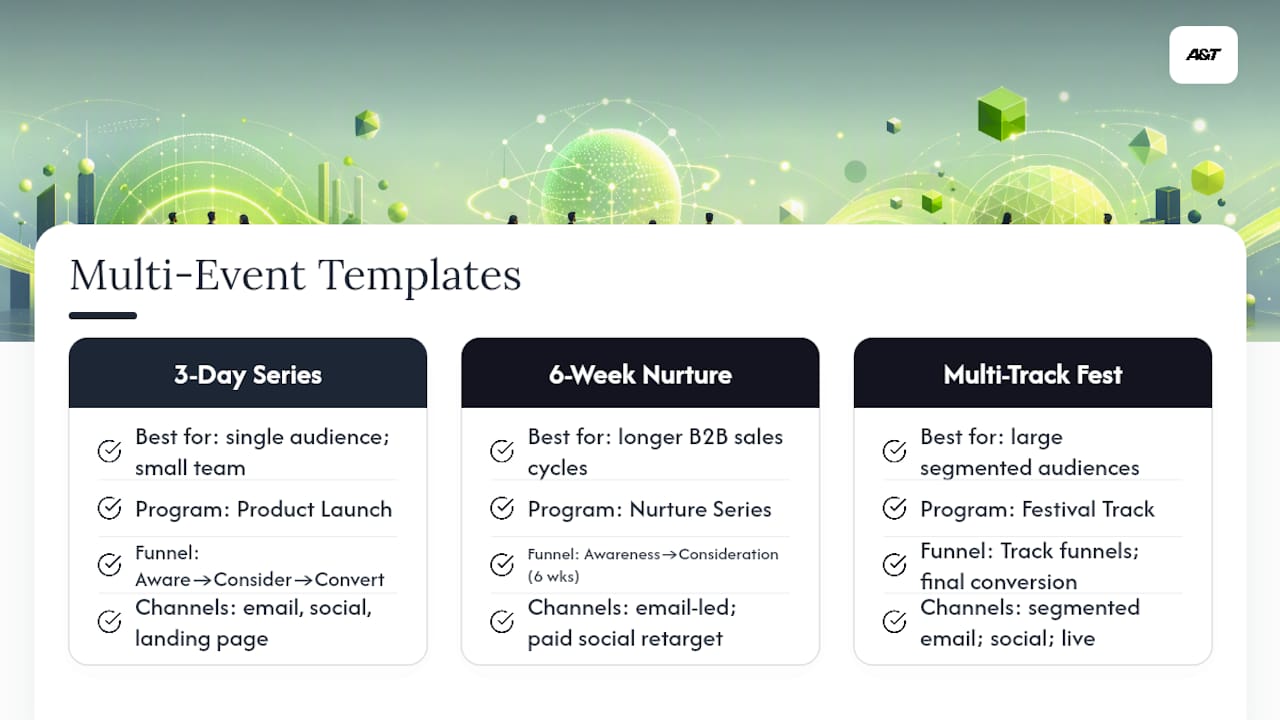
Three templates cover most real-world scenarios: a 3-day series for product launches or focused announcements, a 6-week nurture series for longer sales cycles, and a multi-track festival for large-scale, segmented audiences.
Template 1: 3-Day Series
Best for a single audience, one core offer, and a small team. Name pattern: [Year][Quarter]_[Initiative]_Day[N]. Program Type: "Product Launch." Funnel Stage progresses from Awareness (Day 1) to Consideration (Day 2) to Conversion (Day 3). Channel mix: email, social, one landing page. Timeline: three weeks of promo phases (see the calendar above), three consecutive live days. KPI target: registration-to-attendance rate above industry norms for your vertical, tracked at the parent level. Minimum asset list: one master landing page, three email sequences, six to nine social posts, three reminder emails.
Template 2: 6-Week Nurture Series
Best for longer B2B sales cycles where a single event won't move a buyer through the funnel. Name pattern: [Year][Quarter]_[Initiative]_Week[N]. Program Type: "Nurture Series." Funnel Stage spans Awareness through Consideration across all six weeks, with Conversion reserved for the final session. Channel mix: email-led with paid social retargeting layered in from week three onward. KPI target: MQL generation per session, tracked at the child level, with cumulative pipeline tracked at the grandparent level.
Template 3: Multi-Track Festival
Best for larger audiences segmented by role, industry, or interest, run across multiple parallel tracks. Name pattern: [Year][Quarter]_[Initiative]_[Track]_[Session]. Program Type: "Festival Track." Each track gets its own parent campaign; individual sessions become children. Channel mix: track-specific email segments, broad social for top-of-funnel awareness, livestream for the main stage. KPI target: registration by track, cross-track attendance overlap, and total influenced pipeline at the grandparent level.
For bulk creation, a simple CSV import handles the setup work. Column headers: Campaign Name, Parent Campaign, Program Type, Funnel Stage, Owner, Start Date, End Date, Landing Page URL, Budgeted Cost. Fill one row per child campaign, reference the parent campaign name exactly as it exists in your CRM, and import in batches of no more than fifty to catch naming errors before they multiply.
Common setup mistakes to watch for: skipping the Owner field (creates approval bottlenecks later), reusing a landing page URL across multiple child campaigns (destroys attribution clarity), and building the festival template with more tracks than your team can realistically staff for. Our event promotional campaign types guide breaks down additional format variations if none of these three fit your exact scenario.
How Does Atdigiagency Structure Multi-Event Campaigns for Clients?
We default to the three-tier model on every multi-event engagement, because clean reporting isn't optional when a client is asking what their event spend actually returned. Our standard operating model targets two outcomes on every campaign: qualified lead generation and measurable revenue influence, both tracked back to the grandparent record from day one.
The campaign properties we add to every campaign object, without exception:
- Program Type (webinar, paid social push, in-person, hybrid)
- Initiative (ties every child campaign to its grandparent, critical for HubSpot clients specifically)
- Funnel Stage
- Owner (a named individual on our team, never "the agency")
- Landing Page URL
- Playbook Link (an internal reference to the specific SOP used for that campaign type)
- Budgeted Cost / Actual Cost
A recent example, details anonymized: a wellness brand client ran a three-day product education series with no parent/child structure at all, just three standalone campaigns in HubSpot with inconsistent naming. Reporting required manually cross-referencing three separate dashboards, and nobody could say with confidence which day drove the most qualified leads. We rebuilt it using an Initiative Name property tying all three days together, applied the required custom fields above, and standardized UTMs across every asset. The client's next launch, run through the new structure, produced a single rolled-up report inside 24 hours of the campaign closing, work that previously took the internal team most of a week to reconstruct manually.
A playbook checklist any client can hand to their internal team, or ask us to implement directly:
- Lock the naming convention before the first campaign is created.
- Require the seven fields above on every campaign object.
- Map every UTM to its exact child campaign before assets go live.
- Assign one owner per level, with the grandparent owner approving new child campaigns.
Pro Tip: If your team can't answer "what did this campaign generate in revenue" within an hour of being asked, your structure needs rebuilding before your next launch, not after it.
When Should You Choose Simplicity Over a Complex Campaign Structure?
Default to the simplest taxonomy that still satisfies your reporting needs, and add complexity only when a specific, named reporting requirement forces it. Most teams do the opposite. They build an elaborate hierarchy up front because it feels thorough, then spend the next two quarters maintaining fields nobody actually pulls reports from.
Every additional custom field, every extra tier, every optional tag carries administrative overhead that someone has to maintain manually, usually the same overworked ops person who also owns lead routing and list hygiene. Simplicity isn't a lesser approach; it's the approach that survives contact with a real team's bandwidth.
The trade-off runs three ways. More structure gives you better reporting fidelity, but it raises operational risk (more fields mean more chances for a required value to get skipped) and raises administrative overhead (someone has to audit and maintain that structure indefinitely). A three-tier model with seven required fields, enforced consistently, beats a five-tier model with fifteen optional fields that nobody fills in correctly.
The single most avoidable mistake I've seen repeated across different teams and different platforms: using a parent campaign to represent a time period, "Q2 2026" or "FY26," instead of a channel or program. It seems tidy on day one. By the following January, someone has to manually recreate the entire hierarchy for the new year, migrate every child campaign, and hope nothing gets orphaned in the process. A date field solves this problem permanently and costs nothing to maintain. Over-tagging is the second most common trap: adding custom fields "just in case" that never get populated consistently, which quietly corrupts your filtered reports without anyone noticing until a quarterly review turns up gaps. Our take on campaign consolidation to cut ad waste covers a related version of this same discipline: fewer, cleaner campaigns beat many fragmented ones almost every time.
Ready to Outsource Your Multi-Event Campaign Setup?
Building this structure right takes real hours: naming conventions, field mapping, UTM discipline, and the ongoing maintenance to keep it clean quarter after quarter. Atdigiagency runs this exact playbook for clients who'd rather spend that time on the campaign's creative and offer, not the plumbing behind it.
Our service covers campaign strategy and setup, cross-channel execution across Google Ads and Meta, and the tracking infrastructure that makes reporting trustworthy from launch day. Engagements start a few ways: a kickoff plus template build if you want the structure without ongoing management, full-service execution if you want us running the whole campaign, or a measurement and optimization retainer if your structure exists but your reporting doesn't add up. Teams juggling multi-event budgets often benefit from a finance-side review too. Ready Accounting's guide to agency operations covers budget tracking practices worth pairing with your campaign field setup.
If your last multi-event campaign left you reconciling three dashboards to answer one revenue question, request a paid ads management consultation. We'll show you what the rebuilt structure looks like for your next launch.
Frequently Asked Questions
What's the difference between a series, sprint, and festival campaign structure? A series runs a small number of sequenced days building toward one offer for a single audience. A sprint compresses the same idea into a short, high-urgency window with fewer touchpoints. A festival runs multiple parallel tracks across a longer period for segmented audiences, which raises resource and reporting demands considerably.
Does HubSpot support campaign hierarchy natively? No. HubSpot lacks a native multi-tier structure, so teams simulate it using a consistent naming convention, a custom "Initiative Name" property applied across related campaigns, and tags for filtered reporting. Salesforce, by contrast, supports this natively through its Parent Campaign field.
How many custom fields does a multi-event campaign actually need? Seven is usually enough: Program Type, Initiative Name, Funnel Stage, Region (if relevant), Owner, Landing Page URL, and Budgeted/Actual Cost. Adding more than that without a specific reporting need increases maintenance overhead more than it improves reporting fidelity.
What KPIs should sit at the grandparent level versus the child level? Grandparent-level KPIs should track business outcomes: influenced revenue, total pipeline, overall conversion rate. Child-level KPIs should track tactical performance: click-through rate, open rate, cost per click. Parent-level KPIs sit in between, tracking channel or program performance like MQLs and registrations.
Should I use a parent campaign to represent a quarter or year? No. Use a date field instead. A time-based parent campaign forces a full rebuild of your hierarchy every quarter or year, and it doesn't reflect an actual channel or program, which is what the parent tier is meant to represent.
Sources
- The Ultimate Campaign Management & Hierarchy Guide | Sara McNamara
- How to build a multi-channel event promo calendar like a pro
- Creating a 3-Day Multi-Event Campaign