

TL;DR:
- Most marketing campaigns fail before their first ad runs due to rushed launches, unclear goals, and skipping verification steps. A structured process, including thorough platform setup, tracking verification, and real-time monitoring, ensures campaigns are launched correctly and optimized continuously. Proper preparation and disciplined management prevent wasted budgets and improve the chances of campaign success.
Most marketing campaigns don't fail because of bad creative or weak offers. They fail before the first ad ever runs. A rushed step by step campaign launch, built on unclear goals and skipped verification, bleeds budget fast and delivers nothing useful in return. This guide changes that. You'll get a structured, practical process for how to launch a campaign the right way: from preparation and platform setup to real-time monitoring and post-launch optimization. Follow it once, and you'll never want to wing a launch again.
Table of Contents
- Key takeaways
- Before you build: campaign preparation
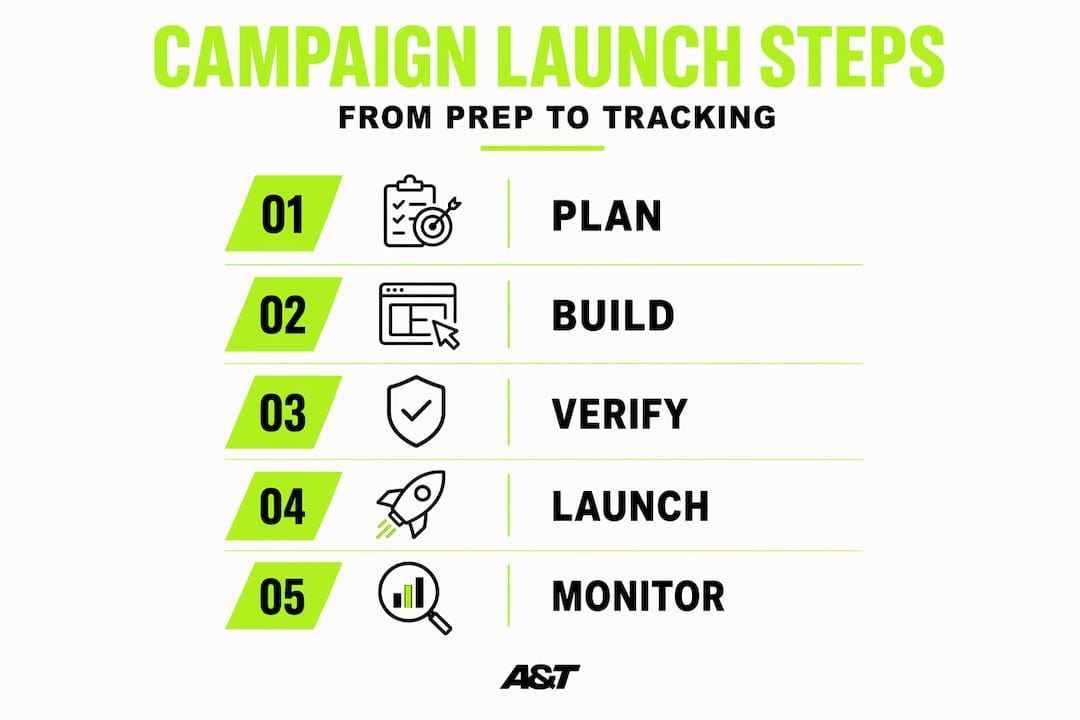
- The step by step campaign setup process
- Real-time monitoring after launch
- Common mistakes that derail campaign launches
- What to expect and do after launch
- My honest take on campaign launches that actually work
- Ready to launch campaigns that actually convert?
- FAQ
Key takeaways
| Point | Details |
|---|---|
| Preparation determines outcome | Define measurable goals and segment your audience before touching any platform settings. |
| Verification prevents waste | Test conversion tracking and review platform diagnostics before going live to avoid silent data failures. |
| Monitor in real time | Use live dashboards to catch performance problems within hours, not days. |
| Launch simple, then scale | Prove your core campaign works before layering in automation or complex ad structures. |
| Treat launch as a starting point | Campaigns need continuous testing and optimization long after the initial launch date. |
Before you build: campaign preparation
Campaigns launched without solid groundwork typically fail due to unclear goals, rushed timelines, and poor alignment across teams. That's not an opinion. It's the pattern we see repeatedly. Skipping the preparation phase feels like saving time. It actually costs you far more.
Here's what you need to lock in before you touch a single platform setting:
- Define measurable goals. "Get more leads" is not a goal. "Generate 50 qualified leads at under $30 cost per lead within 30 days" is. Every campaign decision flows from a specific, numeric target.
- Segment your audience. Know exactly who you're reaching, what they care about, and where they spend time online. A healthcare audience behaves differently on Meta than a retail buyer does.
- Set a realistic budget. Map your budget to your goal. If your average cost per click on Google is $4 and you need 500 clicks to generate 25 conversions, you need at least $2,000 in media spend. Don't guess.
- Gather your assets. Ad copy, images, videos, landing pages, brand guidelines. All of it needs to be ready and approved before launch day. Waiting on a designer the morning of launch is a setup for mistakes.
- Build a timeline with buffer. A 90-day timeline with distinct strategy phases is recommended for major product launches. For smaller campaigns, a minimum of 30 days gives you enough runway for strategy, asset creation, and audience warming before promotion begins.
- Align your team. Cross-team misalignment on messaging causes campaigns to lose coherence and underperform. Marketing, sales, and leadership need to agree on the goal, the message, and the success metrics before anything launches.
Pro Tip: Create a one-page campaign brief that captures your goal, audience, budget, timeline, and key message. Share it with every stakeholder. It takes 30 minutes to write and eliminates a week's worth of back-and-forth.
The step by step campaign setup process
This is where most marketing managers either build something solid or create problems they'll spend weeks chasing. The campaign execution steps below assume you're working in Google Ads or Meta, but the logic applies across platforms.
-
Start clean. Archive or pause any old campaigns that share the same audience, pixel, or budget pool. Conflicting active campaigns split your data and confuse platform algorithms.
-
Configure platform settings thoroughly. Don't rush through campaign-level settings. Set your campaign objective correctly. It determines how the algorithm optimizes your delivery. Choosing "Traffic" when you want purchases is one of the most expensive mistakes in paid advertising.
-
Install and test your tracking pixel. Before you create a single ad, confirm your tracking pixel fires correctly on every relevant page. Use the Meta Pixel Helper or Google Tag Assistant. A pixel that appears installed but fires on the wrong event is worse than no pixel at all because it gives you false confidence.
-
Set up and verify conversion events. Name your conversion events clearly, assign accurate values where possible, and confirm they register in your platform's event manager. Triggering test conversions and waiting 24 hours for data validation prevents launch failures that won't show up until you've already spent money.
-
Build your ad sets and audiences. Layer your targeting deliberately. Start broader than you think you need to, especially on Meta, and let the algorithm find efficiency. Custom audiences built from existing customers or site visitors should be excluded from cold prospecting ad sets to avoid overlap.
-
Upload and schedule creative assets. Match each creative to the ad set it's designed for. Don't mix brand awareness visuals with bottom-funnel conversion copy. Automated asset-to-ad-manager workflows can reduce handoff times by 25% and save roughly 3 hours of labor per campaign if you're running multiple campaigns simultaneously.
-
Document your setup. Screenshot your settings. Record your audience definitions, bid strategies, budget caps, and conversion event names. Documenting setup decisions aids future debugging and preserves campaign integrity when something breaks at 11 p.m.
-
Run pre-launch checks. Review your ad previews on mobile and desktop. Confirm landing page URLs work. Check that budget caps are set correctly at both the campaign and ad set level.
-
Launch on schedule. Deploy according to your timeline. Don't soft-launch without telling anyone. Set your campaign live, note the exact time, and begin monitoring immediately.
Pro Tip: If you're managing a Facebook campaign for the first time, this Facebook campaign setup guide walks through platform-specific configurations that catch most beginners off guard.
| Setup step | Tool to use | What to verify |
|---|---|---|
| Pixel installation | Meta Pixel Helper / Google Tag Assistant | Fires on correct pages and events |
| Conversion tracking | Platform event manager | Events register with correct names and values |
| Audience setup | Ads Manager | No audience overlap between ad sets |
| Creative review | Ad preview tool | Renders correctly on mobile and desktop |
| Budget configuration | Campaign settings | Caps set at both campaign and ad set level |
Real-time monitoring after launch
Launching is not the finish line. The first 48 to 72 hours after going live are when most data problems surface. Catching them early is the difference between a fixable issue and a wasted budget.

Live dashboards aggregating Google Analytics and ad platform data produce 15% faster insight loops and a 10 to 12% lift in return on ad spend within the first week. Build one before you launch. You want to see impressions, clicks, conversions, and cost in a single view without logging into five tabs.
Here's what to monitor and how to act on it:
- Delivery check. Are your ads actually running? Low impressions in the first few hours could signal an approval delay, an audience that's too narrow, or a bid that's too low for your placement.
- Click-through rate. A CTR significantly below category benchmarks in the first 24 hours usually means your creative or headline isn't resonating. Swap it early rather than waiting for statistical significance that may never come.
- Conversion tracking health. Check your platform's diagnostics panel. Look for any "unverified" or "inactive" conversion event flags. These are silent killers. Ads can run and clicks can happen while conversions go completely unrecorded.
- Data reconciliation. Compare what your ad platform reports against what your CRM or internal sales data shows. A 10 to 15% discrepancy between platform data and CRM is normal, but a 40% gap signals a critical tracking failure that must be fixed before you spend another dollar at scale.
- Audience and placement performance. Break down results by audience segment and placement early. Some placements consistently underperform. Cutting them fast preserves budget for what's working.
Set a standing audit rhythm: one check within 6 hours of launch, another at 24 hours, and a full review at 72 hours. This isn't micromanaging. It's data hygiene.
Common mistakes that derail campaign launches
Even experienced marketing managers make these mistakes under deadline pressure. Knowing them in advance is how you avoid them.
Most campaign failures trace back to poor early-stage planning, not weak ad creative. That reframes where your energy should go.
"Most campaign failures are caused by skipping verification steps and misaligned goals, not by bad ads or insufficient budget." — A finding consistent across agency-level campaign post-mortems.
The most common problems and their fixes:
- Skipping verification. Teams that skip verification steps before launching consistently report wasted budget and delayed results. There's no shortcut here. Test the pixel. Confirm the conversion events. Then launch.
- Messaging misalignment. If your ads promise one thing and your landing page delivers something different, you'll pay for clicks that never convert. Walk through the full user journey before launch day.
- Over-automating too early. Overcomplicating early campaigns with too much automation before validating the core setup leads to confusion and wasted spend. Launch simple. One campaign, two or three ad sets, three to five creative variants. Prove it works, then scale.
- Starting promotions too late. Launching your ads the same week as your promotion gives the algorithm no time to learn. Audience warming, retargeting list building, and social proof accumulation all take time. Factor that into your timeline.
- No documented checklist. Memory fails under pressure. Build a pre-launch checklist and use it every time. This also helps when you bring new team members into the process.
For an audit-ready checklist you can apply right now, the ad optimization checklist from Atdigiagency covers both setup verification and ongoing performance review in one place.
What to expect and do after launch
The launch is not the end. It's where the real work begins. Setting the right expectations here prevents premature decisions that kill campaigns that just needed more time.
In the first week, expect your cost per result to be higher than your target. The algorithm is learning. Meta's and Google's systems need impression volume and conversion data before they optimize delivery efficiently. Pull the plug too early and you'll never know if the campaign would have worked.
- Test creative variations. Run at least two to three ad variants per ad set. Let them compete for 7 to 14 days before declaring a winner.
- Pause poor performers decisively. Once a creative or audience has spent two to three times your target cost per result without converting, pause it. Don't wait for it to turn around.
- Scale what's working. Increase budgets by 15 to 20% every few days on winning ad sets rather than doubling overnight. Sudden budget spikes reset the learning phase.
- Add nurture sequences. Paid traffic without a follow-up sequence is a leaky bucket. Connect your campaign to email automations or retargeting flows to recapture unconverted visitors. A marketing automation checklist built for SMBs can help you set those nurture flows up in a structured way.
- Document lessons for the next campaign. What worked? What didn't? Why? Capture it while it's fresh. Your next launching a marketing campaign effort should start from a higher baseline than this one.
Pro Tip: Don't introduce automation features like automated bidding or dynamic creative until you've proven your manual campaign generates results. Automation amplifies what's already there. It doesn't fix a broken foundation.
My honest take on campaign launches that actually work
I've seen businesses spend tens of thousands on paid ads and walk away convinced that "digital marketing doesn't work for us." Almost every time, the root cause wasn't the platform or the budget. It was a launch that skipped the fundamentals.
The step that gets overlooked most often is verification. Specifically, confirming that conversion events actually fire and that the data you're seeing in your ads manager reflects reality. I've watched campaigns run for three weeks with beautiful click-through rates and zero reported conversions, only to discover the pixel was firing on the wrong page the entire time. Three weeks of clean data that meant nothing.
My honest advice for SMB marketing managers working under tight budgets: start with one campaign, one audience, and a handful of creatives. Resist the urge to build complexity before you've built confidence. In marketing like in chess, those who calculate their moves ahead win. That means knowing your goal, testing your tracking, and reading your data before you scale.
Team alignment matters more than most people admit. If your sales team doesn't know what the ad promises, you'll close fewer deals regardless of how good the traffic is. A five-minute briefing before launch closes that gap.
View every campaign as a live system that gets smarter over time, not a one-time project that either works or doesn't. The ones that deliver consistent ROI are the ones that get reviewed, adjusted, and improved every single week.
— Ann
Ready to launch campaigns that actually convert?
Building a paid ad system that delivers consistent results takes more than a checklist. It takes platform expertise, creative judgment, and the discipline to optimize based on data, not instinct. At Atdigiagency, we work with SMBs across telehealth, retail, health and wellness, and entertainment to build and manage campaigns that generate real revenue. From Google Ads management to full multi-channel paid strategies, we handle the setup, the verification, and the ongoing optimization. Our clients don't need more meetings. They need campaigns that convert. If you're ready to stop guessing and start scaling, let's talk about what a well-structured campaign launch looks like for your business.
FAQ
What is a step by step campaign launch?
A step by step campaign launch is a structured process for planning, building, verifying, and going live with a digital advertising campaign in sequential phases. It covers goal setting, platform setup, tracking verification, and post-launch monitoring to prevent wasted spend.
How long does it take to properly launch a campaign?
For smaller campaigns, a minimum of 30 days is recommended to cover strategy, asset creation, and audience warming before the promotional phase begins. Major product launches benefit from a 90-day timeline with distinct phases.
What is the most common reason campaigns fail at launch?
Most campaign failures are caused by poor early-stage planning, including skipped verification steps and cross-team misalignment on goals and messaging. Bad creative is rarely the primary issue.
How do I know if my campaign tracking is working correctly?
Trigger a test conversion on your site and confirm it registers in your platform's event manager within 24 hours. A 10 to 15% discrepancy between platform data and your CRM is acceptable, but a 40% gap signals a critical tracking issue that must be fixed before scaling.
When should I scale my campaign after launch?
Start scaling after you've validated that your core campaign generates results at or near your target cost per result. Increase budgets by 15 to 20% every few days on winning ad sets. Avoid large overnight budget increases, as they can reset the algorithm's learning phase and inflate your costs.